
Platform
Built for Real-World Journey Control, Not Digital Forms
Fieldmaster.ai brings journey requests, inspection, validation, approval, tracking and close-out into one system, built around oil and gas operational requirements.
Compliance
Company and Subcontractor Fleets in One System
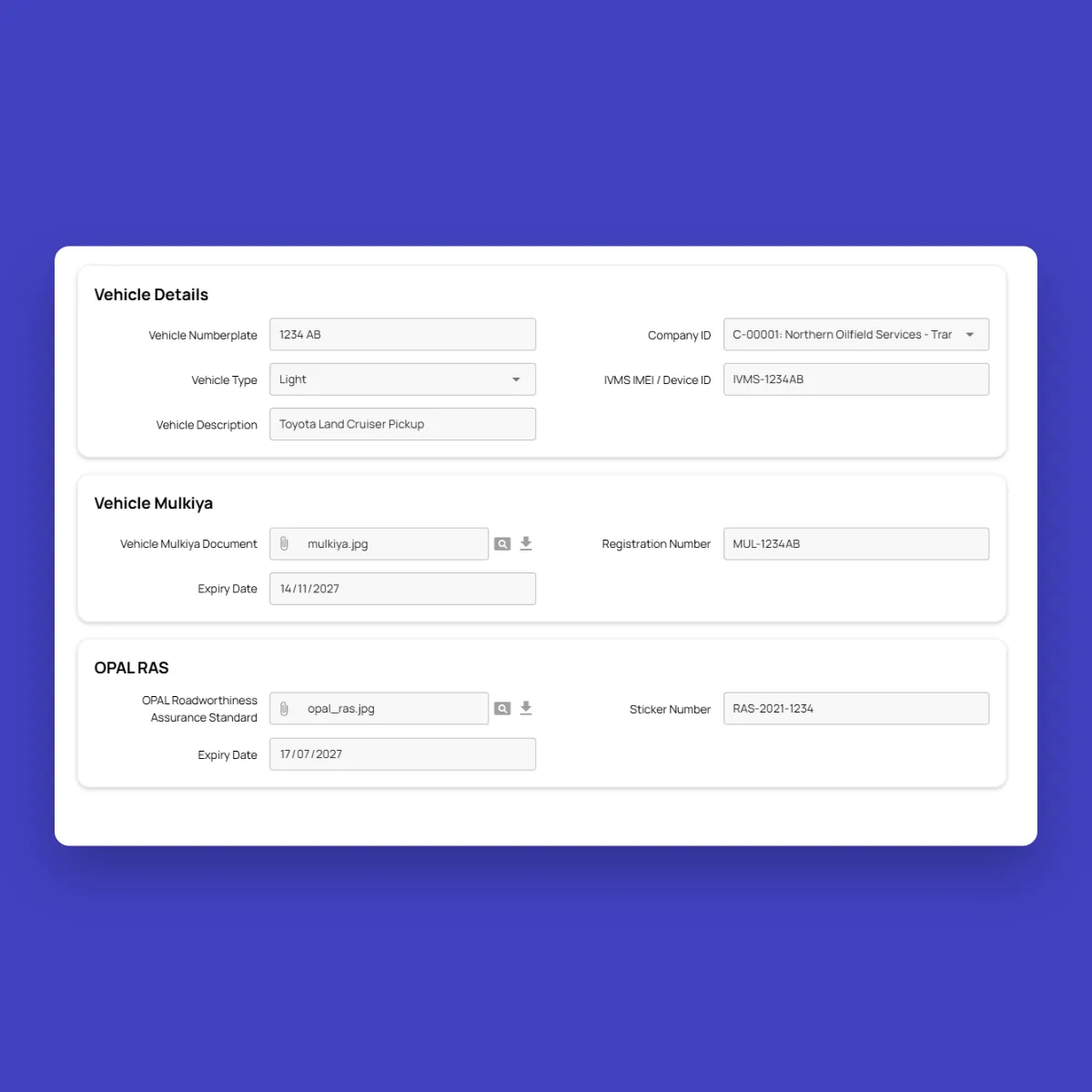
Oil and gas operations often rely on subcontractor vehicles and drivers. In Fieldmaster.ai, every driver and vehicle belongs to a company, and company-owned and subcontractor resources are checked the same way. ROP driving licences, Defensive Driving / OPAL permits, Mulkiya registration and OPAL RAS certificates are stored with photos and expiry dates, and copied onto every journey they’re used on.
The dashboard shows documents that expire within 30 days, and reminders can go to the people responsible before they do. In Saudi Arabia, the same records use Iqama, Istimara and TGA documents.
AI
AI Vision and Voice for Field Compliance
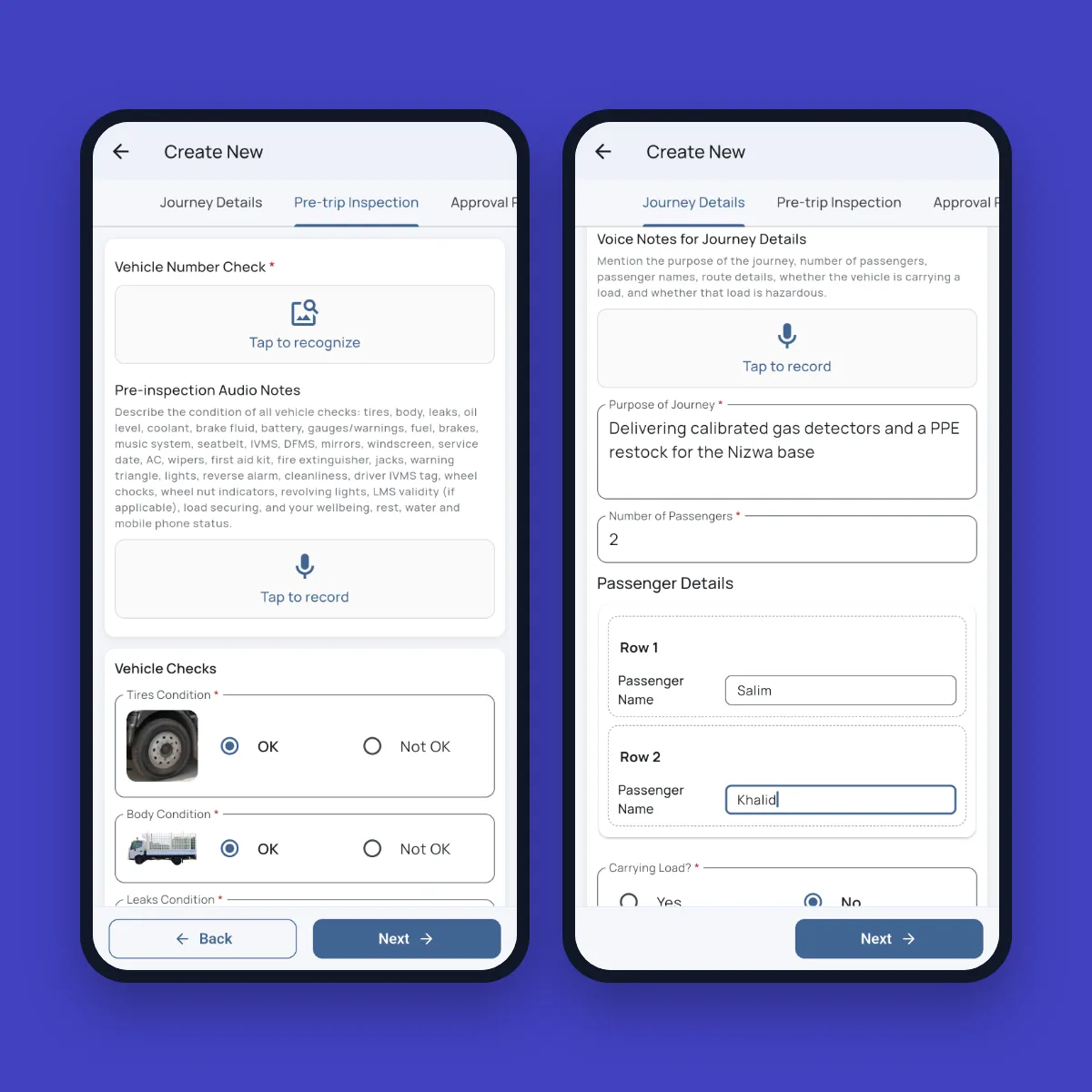
Number plates, including Saudi and Omani plates with Arabic letters, are read from a photo and matched against the vehicle on the request, so a driver can’t inspect one vehicle and drive another. Odometer readings and fuel receipts are read from photos in the same way.
Drivers speak journey details, inspection results and road issues in their own language, such as Arabic, Urdu, Hindi, Malayalam, Tamil, Bengali or Tagalog, and the platform turns what they say into structured English fields. With the HSE module, hazard observations can be reported by voice too.
Monitoring
Risk Monitoring That Continues After Approval
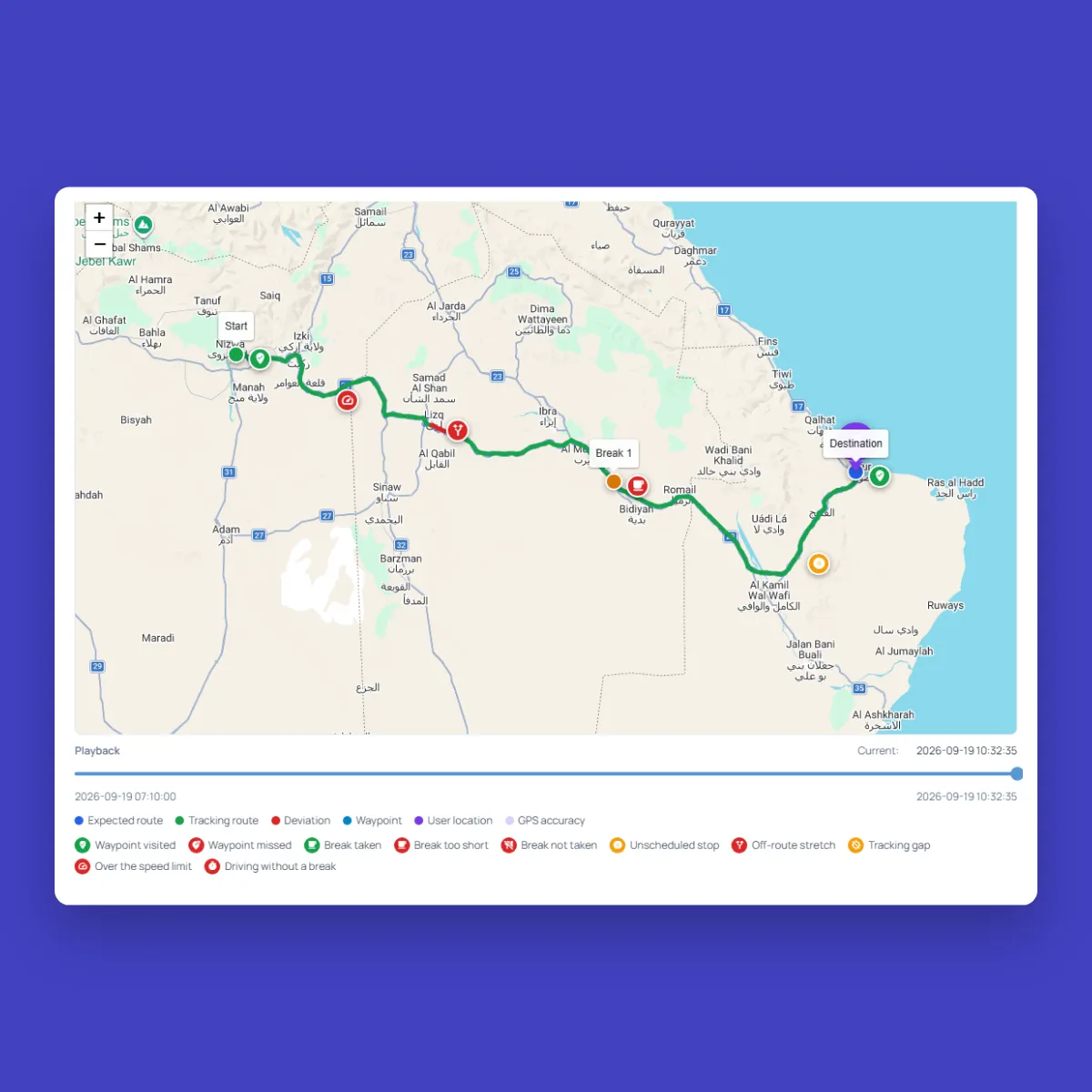
Every approved journey is tracked from the driver’s phone, so no in-vehicle hardware is needed. Breaks, speeding, route deviations, unplanned stops and tracking gaps are flagged against the approved plan. Where vehicles already carry IVMS, Fieldmaster.ai connects to your IVMS platform through the device ID on each vehicle record.
One dashboard shows pending approvals, live journeys, reported issues, fatigue and night-driving alerts, non-compliant attempts and document expiry, across company and subcontractor fleets.
AI
AI That Checks the Driver, the Vehicle and the Paperwork
Before a journey is approved, AI checks the evidence behind it, not just the ticks on the checklist. We switch on the checks that matter to your operation and tune them to your standards during the build.
Pre-trip inspection done properly
The driver can talk through the whole pre-trip check, and every required photo is checked: each tyre, wheel nut indicators lined up, lights working and nothing leaking. A missing or wrong photo blocks the inspection.
Licences and permits read
The driving licence, permits and TREM card are read from a photo, and an expired or mismatched document stops the request.
Load secured
The load photo is checked for straps, covers and placards before a loaded journey goes to approval.
Briefings checked
Pre-journey briefings are recorded and checked against the topics your rules require, with anything missed listed for the Journey Manager.
Risk summary for approvers
AI writes a short summary of the route, weather, driver hours and inspection results, so the approver sees what matters first.
Close-out in plain words
After the trip, AI sums up missed breaks, speeding and route deviations from the tracking record for the close-out report.
Features
More Features Journey Managers Use
Role-based approvals
Drivers, Journey Managers, Authorizing Persons, BU Heads or Project Managers and Resource Managers, each seeing only their own actions and locations.
Your rules, configured once
Approval levels, risk thresholds, inspection checklists and questionnaires are set up to match your procedures, and updated when they change.
Route safety controls
Automatic break planning, a two-hour driving limit between breaks, speed limits and geofenced restricted areas.
Weather along the route
The forecast is checked at each stop for the time the vehicle will reach it, and bad weather adds an approval level.
Journey replay
Replay any journey point by point, with time, speed and position, to investigate incidents.
Clash detection
No driver or vehicle can be approved for two journeys that overlap in time.
Printable authorization
A Journey Movement Authorization PDF for any journey, with route, documents, inspection and signatures.
Fleet and HSE connected
Failed vehicle checks can raise workshop tasks, and issues reported on the road can become HSE observations.
Offline and multilingual
Android and iOS apps that work without signal and in more than 40 languages.
Security and your data
Built for Operations Where Accountability Matters
How your data is protected, where it’s hosted, and how you take it with you.
Encrypted in transit and at rest
Field records, photos and documents are encrypted on their way from the device and while stored on our servers.
Choice of hosting location
Hosted in the US or the EU by default, on enterprise-grade servers. Other locations, for local data rules, are available at extra cost.
Automated backups
Backups run automatically across the whole system, so your data can be fully recovered after an emergency or a system failure.
Your data, yours to export
Your organization owns its data. Every module has an export to Excel, and photos and recordings are provided as download links on request.
Access managed by your admins
Your administrators add and remove people and decide what each role can see and do, down to a single site or unit, without a support ticket.
Complete audit trail
Every submission, edit and approval is time-stamped and attributed, with GPS-tagged photos, ready for audits and disputes.
FAQ
Questions About the Platform
Does the mobile app work offline?
Yes. Field teams can clock in, complete tasks, record inspections and capture photos with no connection. Everything is stored on the device and syncs to the dashboard as soon as it reconnects, so no work is lost.
Which languages does the app support?
The app supports more than 40 languages, including Arabic, Urdu, Hindi, Bengali, Malayalam, Tamil and Tagalog. It follows the language set on each worker’s device, so crews see instructions, checklists and tasks in the language they are most comfortable with. Voice notes can be recorded in any language, even mixing languages in one note. The words appear as the worker speaks, and they can read the English translation before submitting.
Can we build our own workflows?
Yes. Fieldmaster.ai is a low-code platform, and our team configures the forms, approval rules and task sequences to match your business rules. New workflows and changes are delivered in days, without a development project on your side.
Does it connect to our existing systems?
Yes. Fieldmaster.ai connects through open APIs, webhooks and Excel import and export, and can feed your reporting database. Our team builds the link to your ERP, billing or customer systems, so field data flows into the tools your office already uses.
What support do you provide?
Support comes straight from the people who built your app, in Muscat, Ajman and Cochin. During rollout we train your key users, who then train everyone else, and we stay close in the weeks after go-live.
After that, support is available by phone, email and chat, every request is tracked from report to verified fix, and changes to your app take days, not quarters.