Petty Cash and Disbursements, Every Receipt Accounted For

Staff photograph the receipt in the Fieldmaster Pocket app and AI fills in the claim: vendor, invoice number, date, line items, VAT and total. Duplicate receipts are caught automatically, approvals follow your limits, and finance sees what each person has been given, has spent and is still owed.
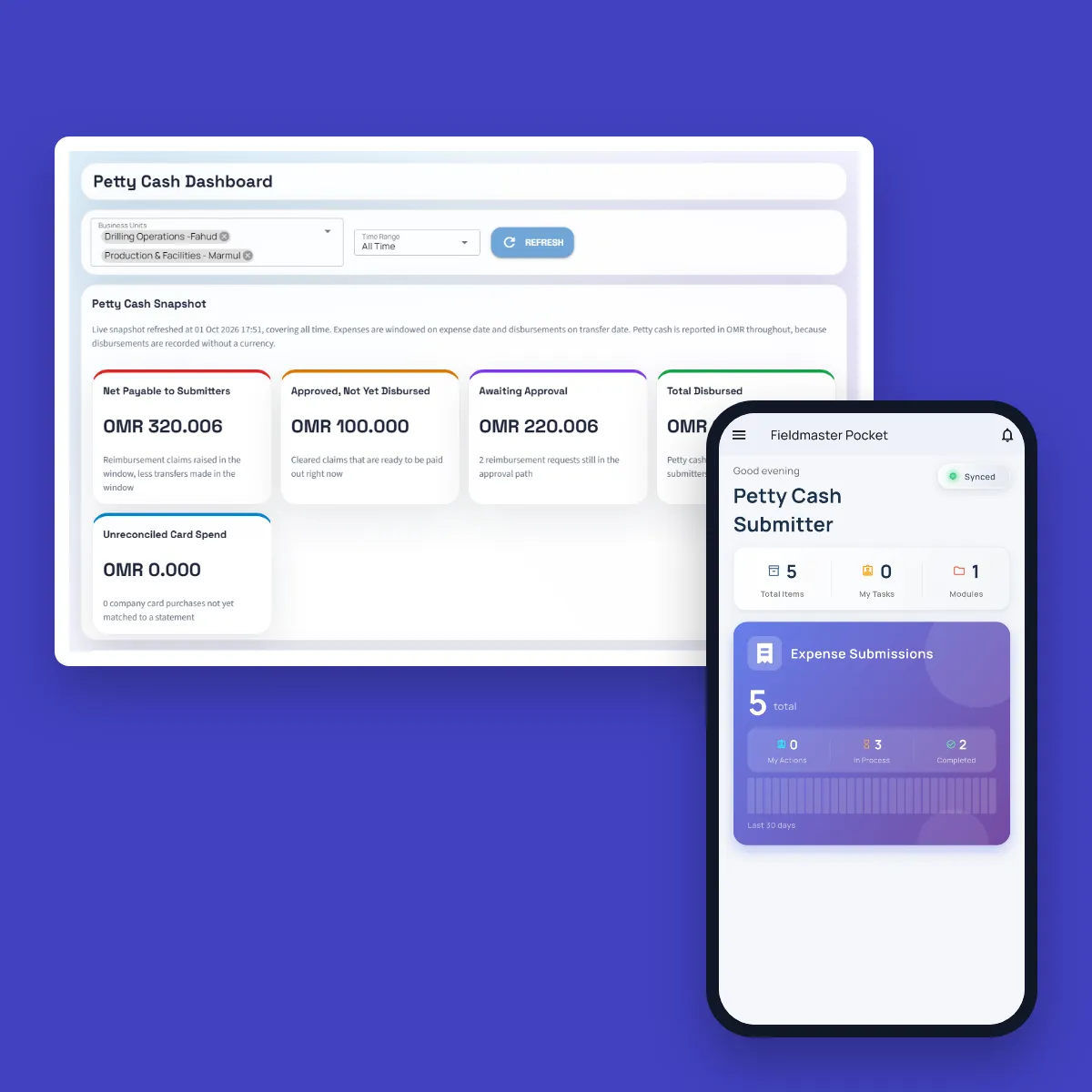

Petty Cash Dashboard in the web console with net payable to submitters, approved claims not yet disbursed, claims awaiting approval and total disbursed, next to the Fieldmaster Pocket home screen of a petty cash submitter

The problem

Where Petty Cash Leaks

Petty cash usually runs on paper: receipts stapled to a voucher, a spreadsheet in the accounts office, and cash handed out against a signature. Receipts fade or go missing, the same bill can be claimed twice, and nobody can say quickly how much each person is still holding.

Company cards are harder still. The statement arrives at month end, and finance has to chase the cardholder for a receipt behind every line.

A desk covered with printed ledger sheets, with a calculator, glasses and a pen

How it works

From a Receipt Photo to a Settled Balance

The employee takes one photo. The platform turns it into a checked, approved and coded claim.

  1. Photograph the receipt

    In the Pocket app, the employee photographs the receipt, stamped with the time and GPS location.

  2. AI fills in the claim

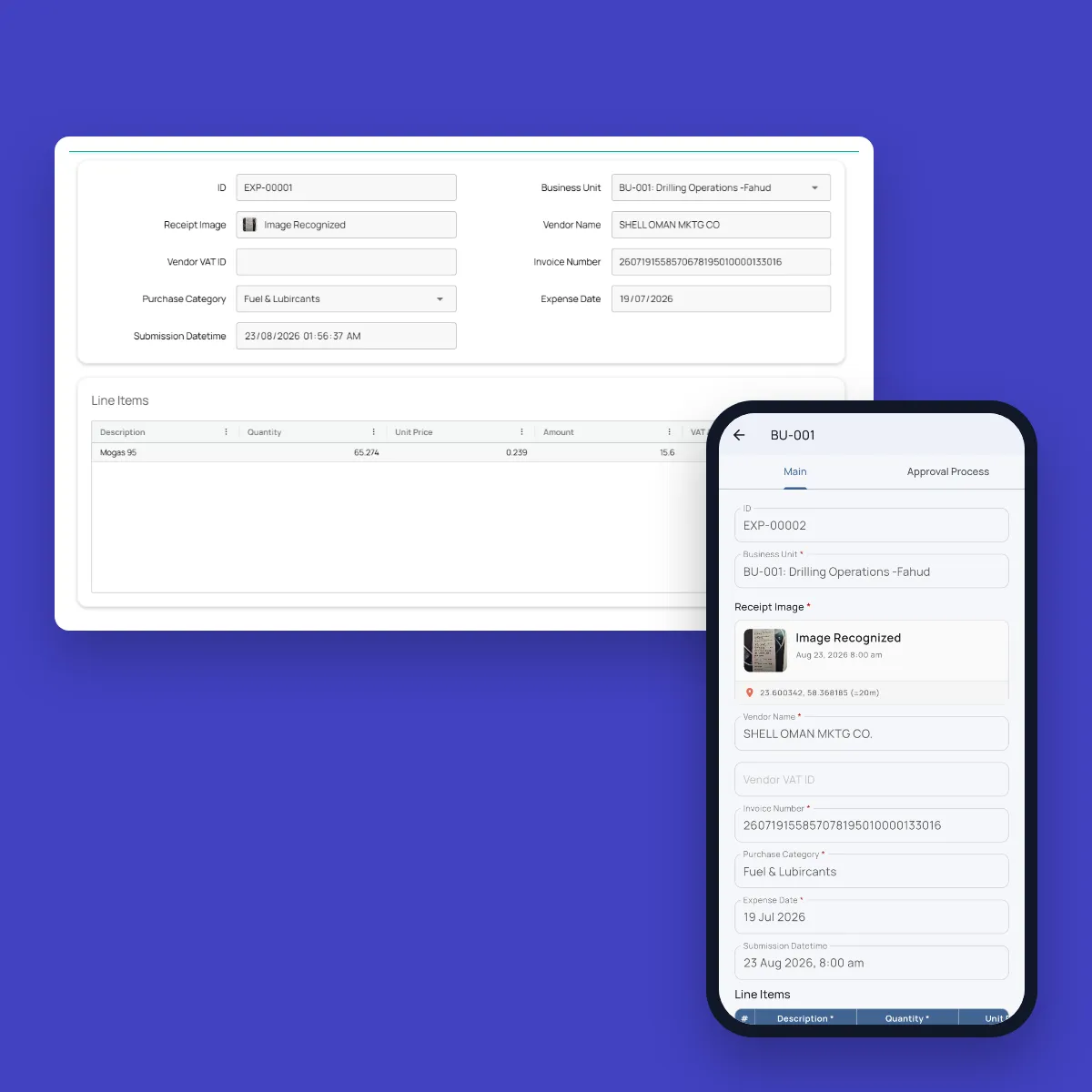
    AI reads the vendor, invoice number, date, line items, VAT and total, and suggests the category.

  3. Duplicates caught

    Each claim is checked against recent ones, and a receipt that was already submitted is rejected.

  4. Approved by your rules

    Small amounts can skip approval by category. The rest go to the approver, who can approve in bulk.

  5. Paid out and balanced

    Finance records each transfer, and every person’s balance shows what they were given, spent and are owed.

AI receipt reading

A Receipt Photo Becomes a Complete Claim

There is no form to type. The vendor, invoice number, date, line items, VAT and total are read from the photo, in any of ten currencies, and the employee checks them before submitting. A photo that isn’t a receipt is turned away. A voice note can explain the purchase, and it’s transcribed.

Each business unit has its own expense categories, each with its GL account and cost centre, so every claim is coded for your accounts as it comes in. A business unit can also require receipts to be photographed inside its own area.

A fuel receipt read by AI in the web console, with the vendor, invoice number, date, category and line item filled in, next to another fuel receipt in the Fieldmaster Pocket app with its receipt photo and GPS location

Company cards

Every Card Statement Matched to Its Receipts

Purchases on a company card are submitted the same way and marked as paid by card, so they never count towards what the company owes the employee.

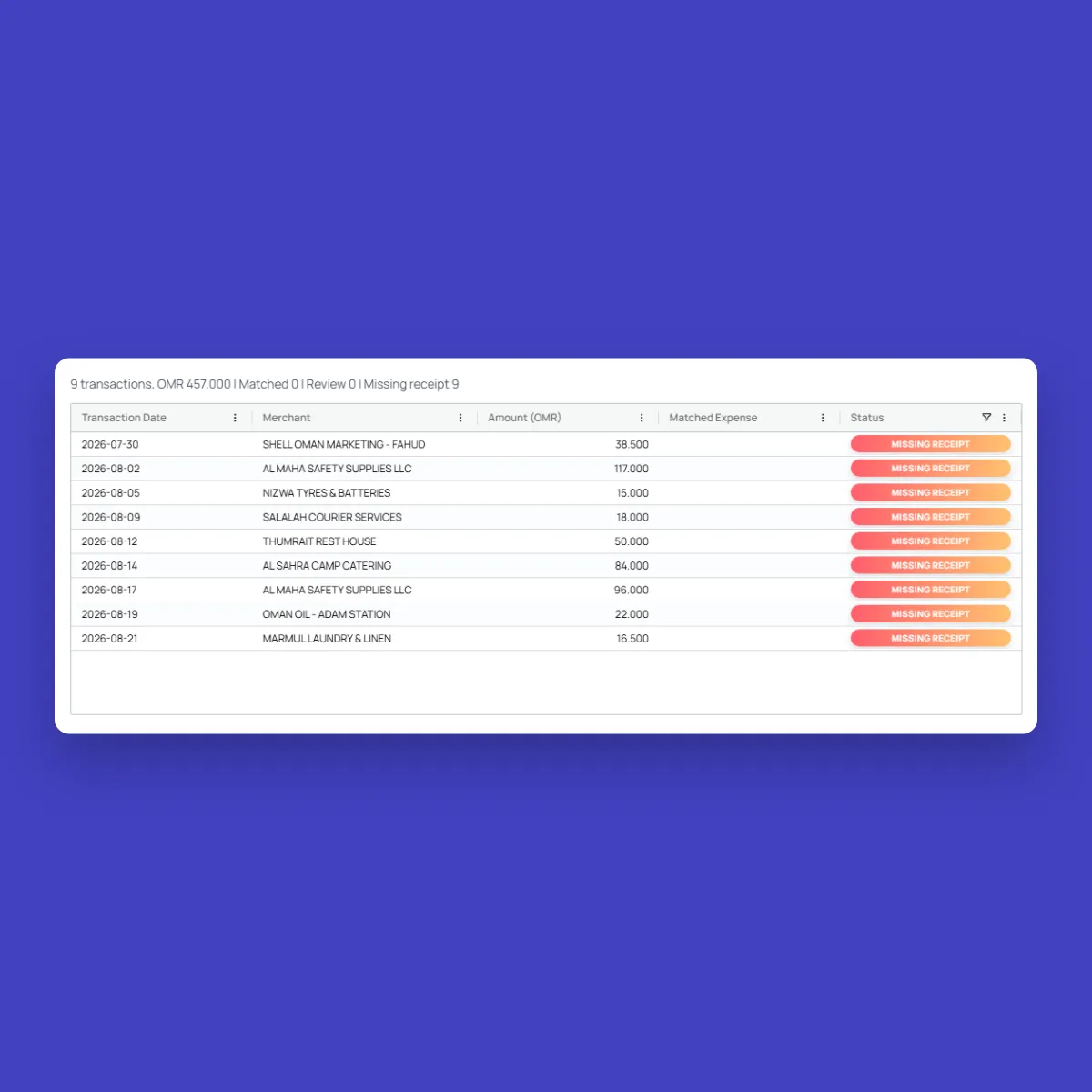
When the statement arrives, finance uploads the PDF. Each transaction is matched to a submitted receipt by amount and date, and anything without one is flagged as a missing receipt. One click sends the cardholder the list of receipts still to submit.

Card statement reconciliation in the web console, with nine company card transactions each flagged as a missing receipt

What changes

Every Claim Traced to Its Receipt

Each claim carries the photo it came from, the checks it passed and who approved it. That is what stops lost receipts, double claims and month-end guesswork.

Paper petty cashWith Fieldmaster
ReceiptsPaper petty cash

Stapled to a voucher, faded or lost.

With Fieldmaster

Photographed at the time of purchase, with the time and GPS location.

Entering the claimPaper petty cash

Typed up by hand, often days later.

With Fieldmaster

Read from the photo by AI, then checked by the employee.

Duplicate claimsPaper petty cash

Spotted only if someone remembers the bill.

With Fieldmaster

Checked automatically against recent claims, even when the receipt is read slightly differently.

ApprovalsPaper petty cash

Every claim waits for a signature.

With Fieldmaster

Small amounts skip approval by category, and the rest can be approved in bulk.

Who holds whatPaper petty cash

Worked out in a spreadsheet at month end.

With Fieldmaster

Each person’s balance: transferred, approved, awaiting approval and still owed.

Company card statementsPaper petty cash

Chased line by line for receipts.

With Fieldmaster

Matched to receipts automatically, with missing ones sent to the cardholder.

Built in

Everything Finance Needs Around the Receipt

Petty cash runs in the same Pocket app your teams already use for their field work.

  • Receipt photo with location

    Every receipt is photographed in the app, stamped with the time and GPS location.

  • Voice notes

    Staff can explain a purchase by voice, and the note is transcribed.

  • Approval limits by category

    Each business unit sets which categories need approval, and above what amount.

  • Roles per business unit

    Submitters, approvers and disbursers are set per business unit, so each sees only their own.

  • Petty cash dashboard

    Net payable, approved but unpaid, awaiting approval, card spend and spend by category.

  • Ready for your accounts

    Every category carries its GL account and cost centre, and the expense list exports to Excel.

FAQ

Petty Cash Questions

What is petty cash management software?

Software that replaces paper petty cash vouchers and spreadsheets. In Fieldmaster, staff submit expenses from a receipt photo, approvers approve them on the web, and finance records disbursements and sees each person’s balance.

Which details does AI read from a receipt?

The vendor name and VAT number, the invoice number, the date, each line item, the VAT and the total, and it suggests one of your expense categories. The employee checks the details before submitting.

How does it handle VAT?

For receipts in Omani rials, AI reads the VAT on each line and in total, and the vendor’s VAT number, which is checked against the Omani format. VAT rules for other countries can be added as part of your setup.

What about purchases on a company card?

They are submitted the same way and marked as paid by company card, so they are kept out of what the company owes the employee. When the statement arrives, its transactions are matched to these receipts, and the cardholder is told about any receipt still missing.

Which currencies can be used?

Receipts can be in Omani rials, UAE dirhams, Saudi riyals, Qatari riyals, Kuwaiti dinars, Bahraini dinars, US dollars, euros, pounds sterling or Indian rupees.

Can expenses go to our accounting system?

Every expense category carries its GL account and cost centre, and the expense list exports to Excel. A direct connection to your ERP or accounting system can be set up as part of your project.