A Low-Code Platform for Field Operations, Built Around Your Process

Fieldmaster.ai is a platform for building business apps that connect people in the field to the office. We build your app around the way your team already works, in days, not months, from building blocks already proven in production.
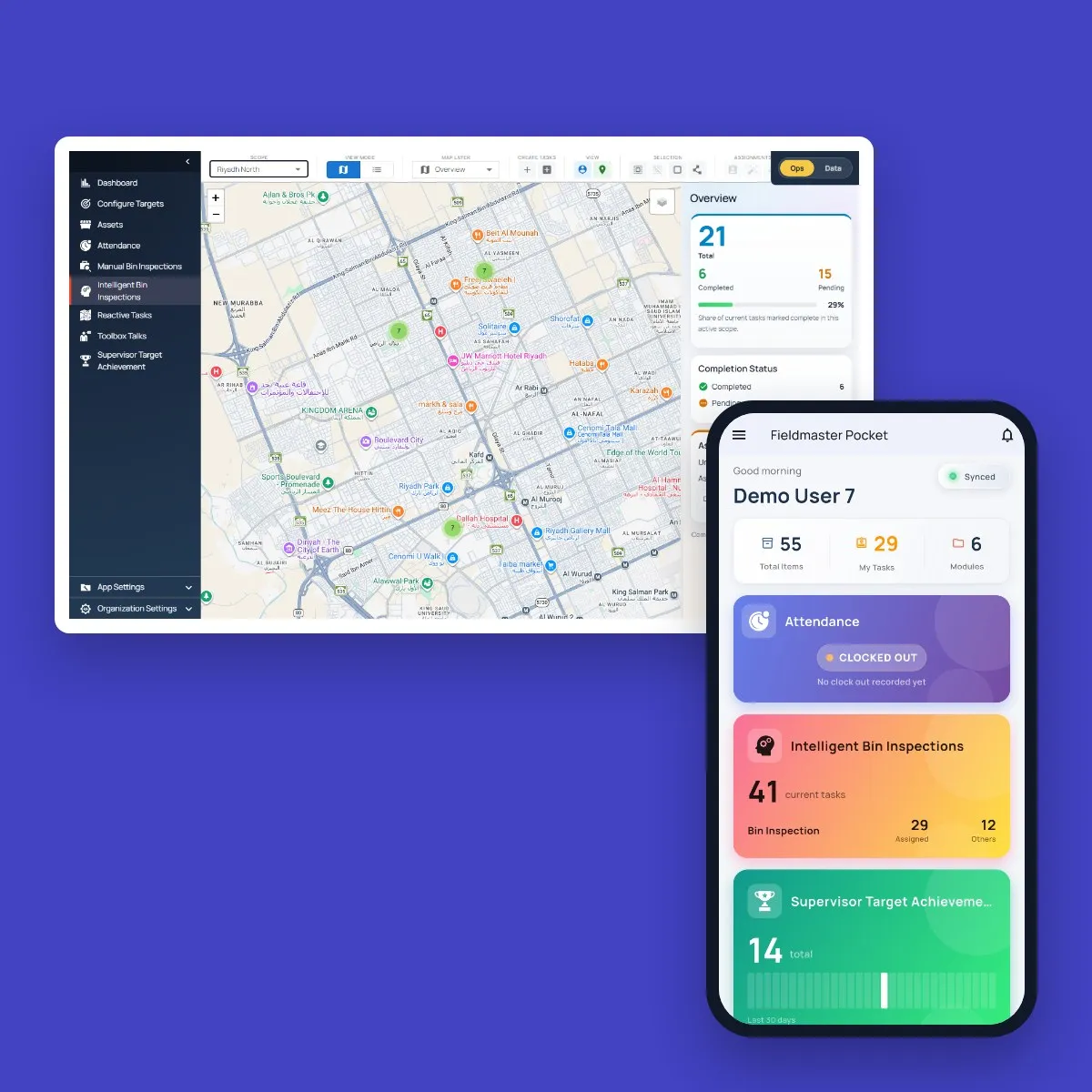
Fieldmaster.ai web console with a live map of the day’s bin inspections and an overview of completed and pending tasks, next to a supervisor’s Fieldmaster Pocket home screen with attendance, inspection and target cards

How it fits together

One Platform Underneath, Any App on Top

The apps you see in our demos are examples of what the platform can do. The platform itself is what you get: the Fieldmaster Pocket mobile app for the field, the web console for the office, and the approvals, roles, AI, dashboards, portals and integrations behind them.

Each app is built for one operation’s process, and any of them can be adapted for the next. Because every app runs on the same base, every improvement we make to the platform reaches every customer at once.

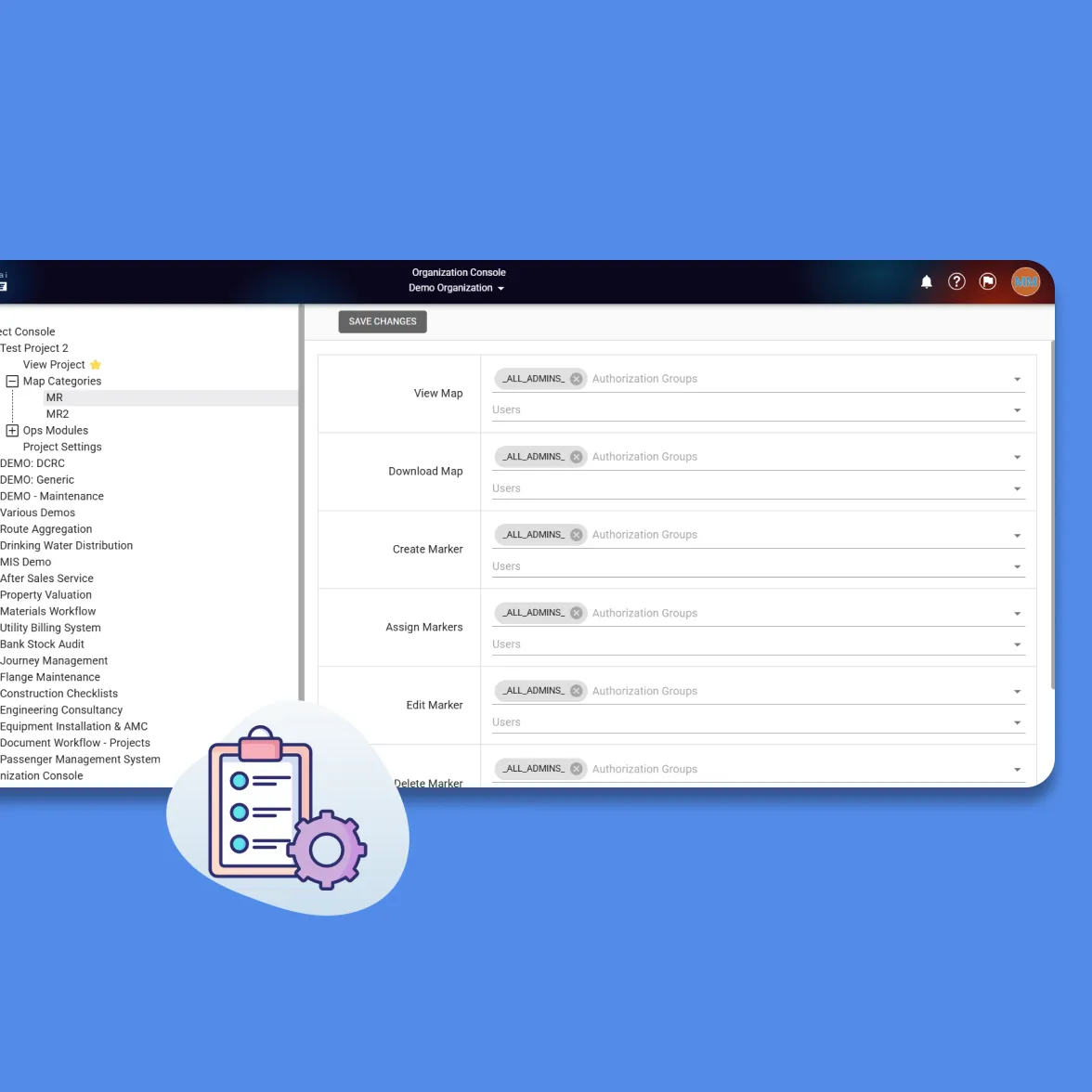
Fieldmaster.ai organization console listing many projects, with access settings for viewing, creating and assigning map markers by authorization group

Who uses it

Everyone Involved in the Work, Inside and Outside the Company

There are no per-user fees, so nobody has to be left out of the system.

  • Field crews

    Technicians, drivers, inspectors and installers use the mobile app: speak, snap, scan and sign, online or offline.

  • Supervisors

    Assign jobs, approve steps and see the work on a map as it happens.

  • Office and finance

    Get clean, complete records with proof attached, ready for invoices, audits and the ERP.

  • Clients and vendors

    Use secure portals to follow work, sign off or submit bids, with no seat fee.

A woman with a tablet talking with two engineers in hard hats and high-visibility vests, one holding a laptop

An easy way to explain it

A Finished Toy vs. a Building Kit With the Builders Included

Off-the-shelf software is a finished toy: it works well when your process matches the one it was designed for. Fieldmaster.ai is a kit of proven blocks, and we are the builders who put them together for you.

Fieldmaster.aiOff-the-shelf software
Starting pointFieldmaster.ai

Ready-made building blocks, already tested in production

Off-the-shelf software

A finished product, built for an average company

Fitting your processFieldmaster.ai

We assemble the blocks around how your team really works

Off-the-shelf software

Your team changes how it works to fit the software

ChangesFieldmaster.ai

New screens, steps and reports in days, not quarters

Off-the-shelf software

Changes wait for the vendor’s roadmap

Cost as you growFieldmaster.ai

Priced on the work done, not on the number of users

Off-the-shelf software

Extra modules and per-user licenses add up

The building blocks

Every App Is a Combination of the Same Proven Blocks

This is what low code means to us: we configure blocks that already work, instead of writing your app from scratch. Here are some of the ones your field team touches.

  • Mobile forms

    27 field types, from text, photos and video to GPS, signatures and areas drawn on a map.

  • Voice fill

    Workers describe the job in Arabic, English, Hindi, Urdu or another language, and AI fills in the form.

  • Photo AI

    AI reads meters, labels and number plates, spots problems such as a leak or missing branding, and rejects the wrong photo on the spot.

  • Scan and verify

    Barcode, QR and text scanning brings up the right asset, and a face check confirms who clocked in.

  • Tasks on a map

    Jobs assigned to field staff by hand or automatically, with live tracking.

  • Approvals

    Any chain of steps, each owned by a role, signed on the phone or the web, with the full history kept.

  • Works offline

    Forms, photos, scans and voice notes are saved on the phone without signal, and sync with their original timestamps.

  • Clock-in and geofences

    Face check at clock-in, with the location checked against the site or depot boundary.

  • Trip tracking

    The phone records the route, breaks and speed while a journey is under way, with no in-vehicle hardware.

And Some of the Blocks the Office Runs On

  • Roles and access

    Who sees and edits what, down to a single site or unit.

  • Dashboards

    Headline numbers and charts, and every chart exports to Excel.

  • Portals

    Secure pages for clients and vendors, for example to submit a bid.

  • Documents

    PDF reports, invoices and certificates, generated when you need them.

  • Automations

    Scheduled jobs, reminders, alerts and nightly checks.

  • Integrations

    Connections to your ERP and customer systems, in both directions.

  • Registers and stock

    Assets, bins, meters, vehicles and SKUs, each with its full history, and stock tracked across stores.

  • Planners and SLAs

    Preventive maintenance schedules, recurring inspections and response-time targets tracked on every job.

  • Audit trail

    Every submission, edit and approval is time-stamped, located and attributed, ready for audits and disputes.

AI

AI That Checks the Work, Not Just Fills the Form

Voice fill and photo reading are where it starts. The same AI looks at what each photo shows, checks that the job was done the way your procedure says, and grades the people doing it. We switch on the checks that matter to your operation and tune them to your standards during the build.

  • Listens

    Workers speak in their own language, mixing languages if they like, and the text appears as they talk. AI fills the form in English, and even a whole stock count or concrete pour plan can be spoken instead of typed.

  • Reads

    Meters, gauges, number plates in Arabic or English, odometers, receipts, delivery notes and concrete dockets, VIN plates, device labels and certificates are read from a photo.

  • Spots problems

    AI sees what’s wrong in a photo, even when nobody mentions it: an overflowing bin, missing branding, a leak, corrosion, a missing guardrail, honeycombing in fresh concrete.

  • Checks it was done right

    Every wheel nut indicator lined up on a vehicle check, rebar spacing and cover before a pour, every helmet and hi-vis in a crew photo. A wrong or missing photo blocks the step.

  • Grades against your standard

    A toolbox talk is checked against the topics it had to cover, and the presenter is graded. Close-out photos are graded as evidence, and device installs on their workmanship.

  • Drafts and flags

    AI drafts the five whys, service reports and tender summaries, turns an email and its PDFs into an assigned task, and flags readings, fuel use or faults that don’t fit the pattern.

Field data collection

The Worker Talks. The Office Gets a Clean Record.

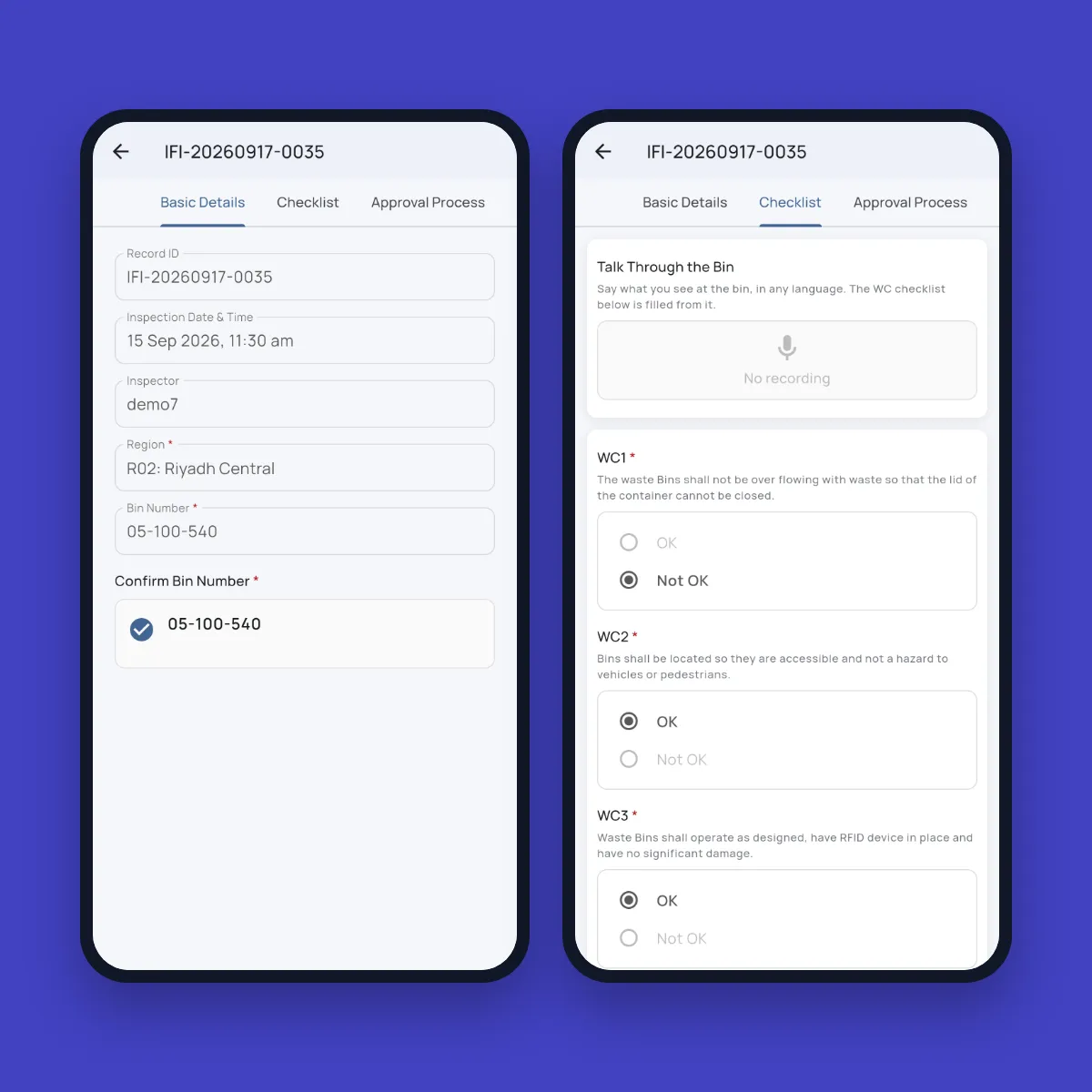
A supervisor at a street bin scans the bin number, takes a photo and says what they see: overflowing, lid broken. AI fills in the checklist from the voice note and checks that the photo shows the right thing. It looks at the bin itself too, so faded branding or rubbish dumped beside it is flagged even if nobody mentions it. The record reaches the office already stamped with the GPS location, the date and time and who did it, and goes straight into the approval chain.

That is the pattern behind every app on the platform. People in the field do what comes naturally: speak, snap, scan and sign. The platform turns it into the structured record the office needs, and keeps working where there’s no signal.

Fieldmaster Pocket bin inspection screens: the record with a confirmed bin number, and a checklist with a field for talking through the bin above OK and Not OK items

Why field focus matters

What Happens When the Field Is Left Out

Most systems are built for people at desks. Crews who don’t read English, wear gloves and have no time for long forms stay on paper, phone calls and chat groups, and the business pays for it in ways no report shows.

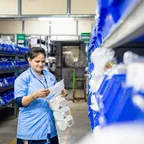
  • A storeroom worker in a blue uniform checking a paper list against stock on shelves of blue parts bins

    Material walks off site

    Stock is issued on paper and never proven to reach the site. Parts leave the shelf without a record, and the loss only shows at the stock count.

  • Tall stacks of paper files and folders piled up in an office

    Decisions on stale data

    Reports are typed up after the shift or at month end, so managers act on last week’s picture instead of today’s.

  • A gloved hand filling in a paper checklist on a clipboard outdoors

    No proof it was done

    A ticked paper form or a photo in a chat group can’t show which asset was checked, when, or by whom.

  • A worker in an orange high-visibility vest writing on a sheet of paper at an outdoor site

    Errors from copying by hand

    Meter numbers, part codes and readings are retyped from paper, so the wrong record is saved or the same job is claimed twice.

  • A bearded worker in a hard hat and work shirt holding a tablet on site

    Crews stop reporting

    Workers who don’t read or write English well avoid the forms, so the hazards and faults they see never reach the office.

  • A worker in a blue hard hat and harness talking on a mobile phone at a roadside work site

    Faults that go nowhere

    Problems are reported by phone or chat and get lost between supervisors and the workshop, so the same fault goes out again tomorrow.

  • Two men at a table pointing at printed documents with a pen, one in a white thobe and red-checked shemagh

    Late invoices and disputes

    Finished work can’t be billed until the paperwork arrives, and without proof from the site every quantity is open to argument.

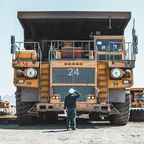
  • A man standing in front of a large yellow mining dump truck

    Checks done from a desk

    Vehicle checks, permits and inspections get signed without anyone going there, until an audit or an incident shows it.

Speed

From First Conversation to a Working App in Days

Most of your app already exists before your project starts. We spend the time on your process, not on rebuilding the basics.

  • 95%+

    of every app is the platform

    Already built and proven in production before we start on yours.

  • 10–18

    working days

    To build a typical app.

  • 20+

    apps built

    On the same platform, across safety, fleet, utilities, waste, procurement and property.

  • Days

    for changes

    Once you’re live, new screens, steps and reports arrive in days, not quarters.

Apps built on the platform

The Apps Are Examples. The Platform Is the Product.

Each solution below is the platform set up for one kind of field work. If yours isn’t listed, we can build it on the same base.

  • City Waste Management

    Bin inspections, crews, collections and fleet across city regions.

  • Utility Meter Management

    Meter replacement programs and reading rounds, with every visit backed by photos.

  • Safe Journey Management

    Driver, vehicle and route checks before every journey, and tracking from the driver’s phone.

  • Purchase & Material Management

    Requests, approvals, vendor quotes and stock across stores, from purchase to issue.

  • Facilities & Asset Maintenance

    Preventive maintenance, reported faults and work orders closed with photos and readings.

  • HSE Management

    Observations, incidents, permits and corrective actions, reported by voice or photo.

  • Fleet Management

    Vehicle checks at clock-in, defects and breakdowns, dispatch and fuel across depots.

  • More use cases

    Permits to work, gas cylinder deliveries and other processes built on the same blocks.

Compare

Weighing Up the Alternatives

The big platforms and field tools are excellent at what they were built for. Here is how Fieldmaster.ai differs, side by side.

  • Fieldmaster.ai vs. Power Apps

    For teams on Microsoft 365 deciding whether to build field apps themselves.

  • Fieldmaster.ai vs. SafetyCulture

    For teams choosing between an inspection tool and the whole process, delivered.

  • Fieldmaster.ai vs. ERP field service modules

    For teams that already run an ERP and want field data to reach it.

FAQ

Questions About the Platform

What does low code mean at Fieldmaster.ai?

We build your app from ready-made blocks, such as forms, approvals, dashboards and portals, instead of writing everything new. Our team does the building, so you don’t need developers of your own.

Do you have an app for our kind of work?

Perhaps already: we have built more than 20 apps on the same platform, across safety, fleet, utilities, waste, procurement and property. If not, we can build it. A typical app takes 10 to 18 working days.

We already have an ERP. Why would we need this?

We don’t replace your ERP. Fieldmaster.ai is the field layer that feeds it clean data, working alongside the ERP you already have. Integrations run in both directions.

Power Apps is included with Microsoft 365. Why not build it ourselves?

The tool is included; building the app, the AI, support and changes are not. We deliver the working app, built for field staff, in weeks.

Our process is unique. Will it fit?

That’s the point. We build around your process instead of forcing you into ours, and we keep adapting it as your process changes.

You’re a small company. Is that a risk?

The platform already runs many apps in production. You talk directly to the people who built it, and changes land in days, not quarters.

Does the mobile app work offline?

Yes. Field staff keep working without signal, and everything syncs as soon as the phone reconnects.

How is it priced?

A one-time setup fee to build your app, and a yearly subscription priced on the work the app handles, never per person. Every user is included. Our pricing page explains how it works.