

The progress report that actually arrives is the one that costs the supervisor a minute at the end of the shift. As they clock out, they take a few photos of the work and speak for a minute in their own language: what was done, what’s holding things up, what they need. The office reads the transcript in English, next to the photos, the site and the time. You see how every site is going without driving to it.
This guide is for contractors and service companies running crews at several sites at once. It covers why written reports fail, what a useful site progress report contains, and how to get one from every site on the schedule you choose.
Why Written Progress Reports Don’t Arrive
You can visit two sites a day. If you run a dozen, you depend on the supervisors to tell you how the rest are going, and the usual ways break down:
- Writing is the hardest part of their day. A good foreman runs a crew well and may not be comfortable writing a report, least of all in English.
- The end of the shift is the worst time. Everyone wants to leave, and a report form gets a line like “work in progress”.
- Nobody notices a report that wasn’t sent. A missing report looks the same as a quiet day, until a problem surfaces a week later.
So most companies fall back on photos in a group chat.
What a Group Chat Gets Wrong
A chat group is better than nothing, and it’s how many site managers work today. But as a progress record it has gaps:
- Photos lose their place. A photo of rebar could be from any tower, and a week later nobody remembers which.
- Voice notes stay in the language they were spoken. A foreman explaining a delay in Hindi or Malayalam is clear to the crew, and lost on a manager who doesn’t speak it.
- Nothing is on a schedule. Some sites post every day, some go quiet for a week, and nobody can tell which sites haven’t reported.
- It mixes with everything else. Progress photos sit between leave requests, jokes and location pins, and never become part of the company’s records.
What a Useful Site Progress Report Contains
Whatever tool you use, a report you can act on has:
- The site and the date it covers, recorded by the system, not typed.
- Who sent it, so you know whom to call back.
- Photos of the work, enough to see progress from one report to the next.
- What was done and what’s holding things up, in words, not only pictures.
- A schedule, so you know when a report is due and can see when one is missing.
The first three can come from the phone at no effort to the supervisor. The fourth is the one that usually goes missing, and it’s where voice helps most.
Report by Voice, Read in English
Speaking is faster than typing, and a supervisor speaks best in their own language. A voice note that is written down and translated keeps both: the supervisor says it in Hindi, Arabic, Malayalam, Tamil or Telugu, or a mix with English, and the office reads it in English next to the original.
For example, a foreman at a tower site records a note in Hindi while clocking out. The office reads: “The safety net on the edge of the eighth floor is loose. I will get it fixed first thing tomorrow morning.” Three photos of that day’s work sit beside it. That is a progress report and a safety note in one minute, from someone who would never have written either.
How Often Should Each Site Report?
Not every site needs a report every day. Set the schedule to the pace of the work:
- Every day for sites where a day’s work matters: a pour, a shutdown, a site with a deadline this month.
- Chosen days of the week for steady work, for example Sunday to Thursday, or only on Sundays for a long fit-out.
- Chosen dates of the month for maintenance contracts and sites you only need to see now and then.
One report per site per due date is enough. If two supervisors are at the same site, the first one to clock out covers it.
How Fieldmaster Does It: Site Inspection at Clock-Out
In Fieldmaster’s field attendance app, the progress report is part of clocking out, so it can’t be forgotten at the end of the shift:
- A schedule per site. Turn on site inspection for a site and choose when it’s due: every day, chosen days of the week, or chosen dates of the month.
- At clock-out. When an inspection is due, the site’s inspector sees it as they clock out there: up to 15 photos of the site and a voice note.
- Translated into English. The voice note is written down and translated, so the office reads it in English next to the original.
- Tied to the clock-out. Every inspection comes with the clock-out it was taken at, so you know who took it, when and at which site.
- Who inspects. The site’s supervisors by default, or only the people you pick for that site.
- Mandatory if you want. Make it mandatory, and nobody due to inspect can clock out without at least one photo. A date that was missed is asked for at the next clock-out.
- What’s overdue. The Sites list shows each site’s last inspection, and which sites are up to date and which are overdue.
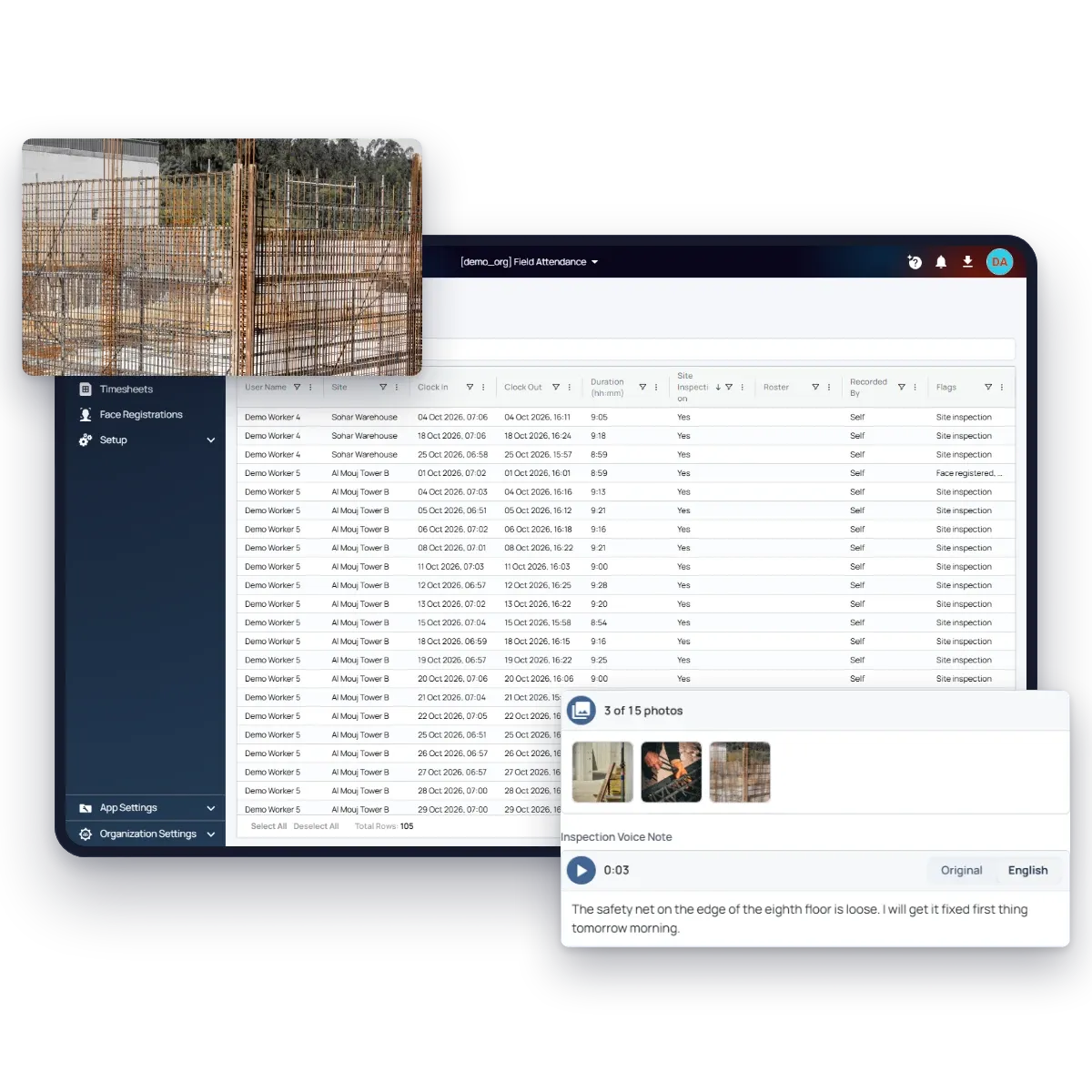
The same app records attendance: workers clock in on their own phone with a face check inside each site’s fence, and crews without phones are clocked in by their supervisor. So the record of who was on site and the record of what they did come from the same clock-out.
When the Standard Report Isn’t Enough
Some companies need more than photos and a voice note: a checklist for each type of work, the report in their client’s format, or an approval before it goes out. Most apps you sign up for stop at their settings. Fieldmaster is built to be changed for each customer, so the inspection can ask your questions, follow your rules and go to your other systems. You can start with the standard app and have it tailored when you outgrow it.
Questions to Ask Before You Choose a Tool
- Can the supervisor report by voice in their own language? And can the office read it in English?
- Is the report tied to the site and the time automatically? Or does someone have to type which site it was?
- Can you set a different schedule for each site? Daily for some, weekly or monthly for others.
- Can you see which sites haven’t reported? A missing report should show, not hide.
- Can you make it required? So the report comes before the supervisor goes home.
- Do you know who sent it, and that they were there? A face check and the site’s fence answer both.
- What happens when you need it to work differently? Ask whether the vendor will change the app for you, or only offers settings.
Try It on Your Own Sites
Site inspection is part of Fieldmaster’s field attendance app. See how site inspection works, or start your free trial: you set it up yourself, and no credit card is required.