
Platform
The Features Behind Facilities and Asset Maintenance
Fieldmaster.ai has hundreds of features. These are the ones facilities teams, maintenance contractors and asset owners rely on every day.
Mobile
One App for Technicians, Inspectors and Storekeepers
Built for people who are rarely at a desk. Technicians see their jobs for the day, scan assets, take photos and describe their work by voice. Inspectors walk units and common areas, and storekeepers receive and issue parts from the same app.
Plant rooms, basements and remote pump stations often have no signal, so the app keeps working offline and syncs with the original timestamps as soon as it reconnects. It runs on Android and iOS.
Inspections
Checklists Built From Each Unit’s Layout
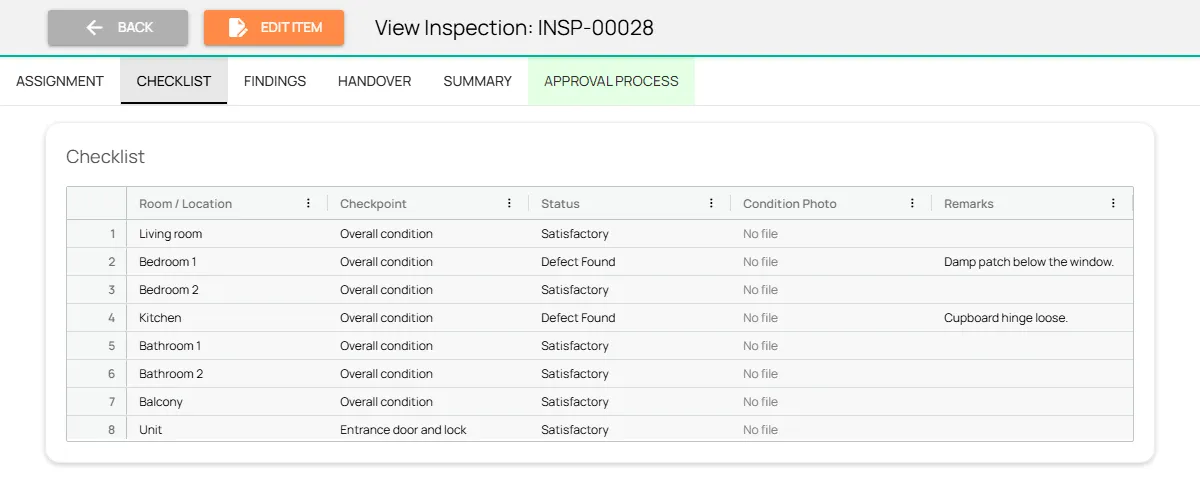
Describe each unit type once, with its rooms and fittings, and every inspection starts with a checklist row for each room. Each checkpoint is satisfactory, defect found, not applicable or not checked, and an unchecked row is never counted as a pass.
Move-in inspections record the unit’s condition, supplied items and meter readings. At move-out, the platform lays the two records side by side, room by room, and names anything that can’t be compared.
Stores
Parts and Consumables Tracked to the Job
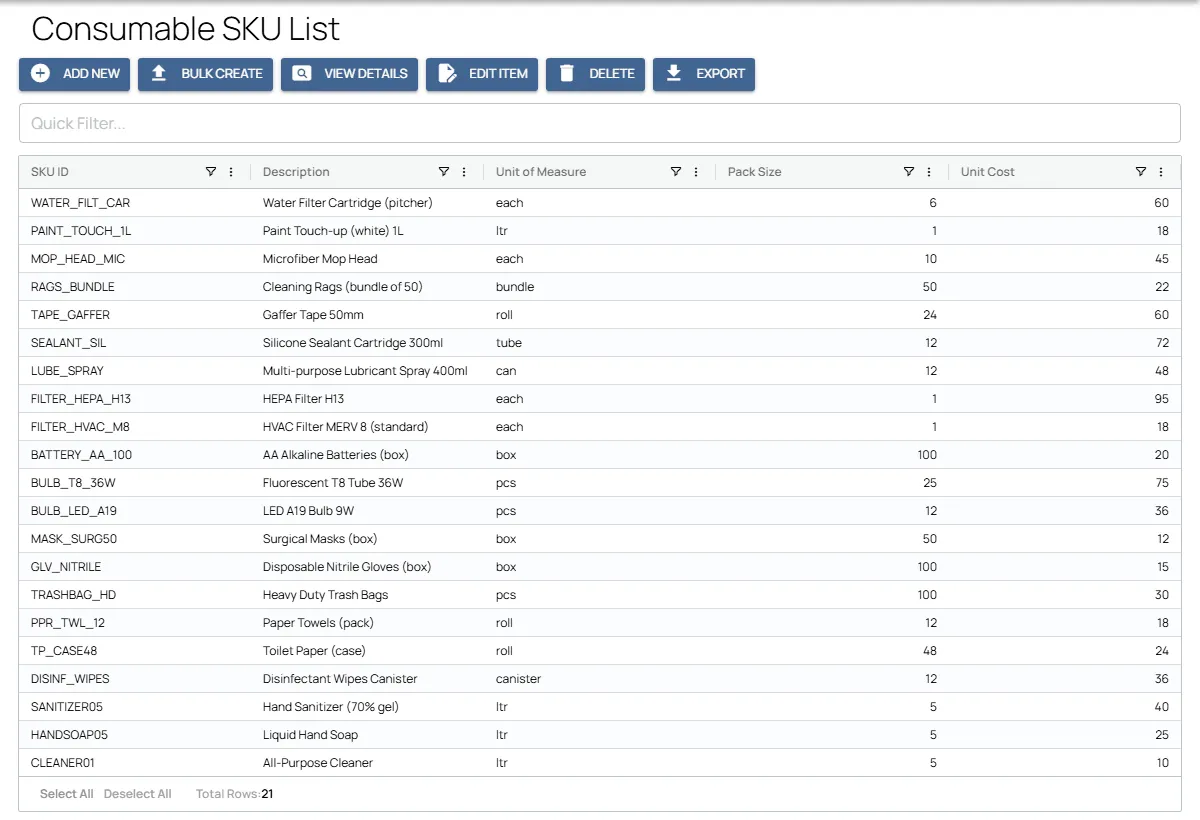
Filters, bulbs, sealant and spare parts are listed with their unit of measure, pack size, unit cost, reorder level and storage condition. Stock is received into each store and issued to a specific job, and the app won’t issue more than the store holds.
Technicians record what they used and what they returned, and each job shows its materials cost.
AI
AI That Checks the Building and the Work Done on It
Inspectors and technicians take the photos, and AI looks at what they show. We switch on the checks that matter to your operation and tune them to your standards during the build.
Defects from photos
Spots leaks, damp, cracks, corrosion and damaged fittings in inspection photos, and suggests the trade and priority.
Gauges and displays
Reads needle, digital and level gauges with their units, such as bar, PSI or °C, and flags values in the red zone or outside the normal range.
Nameplates
Reads the make, model and serial number from an asset’s nameplate to fill in the asset register.
Work done properly
Compares before and after photos to confirm the fault was fixed and the area left clean before the job can close.
Fire and safety equipment
Checks extinguisher gauges, tags and seals in the photo, and that exits and fire doors are clear.
Repeat faults
Points out assets and units where the same fault keeps coming back, so they get fixed for good.
Service reports drafted
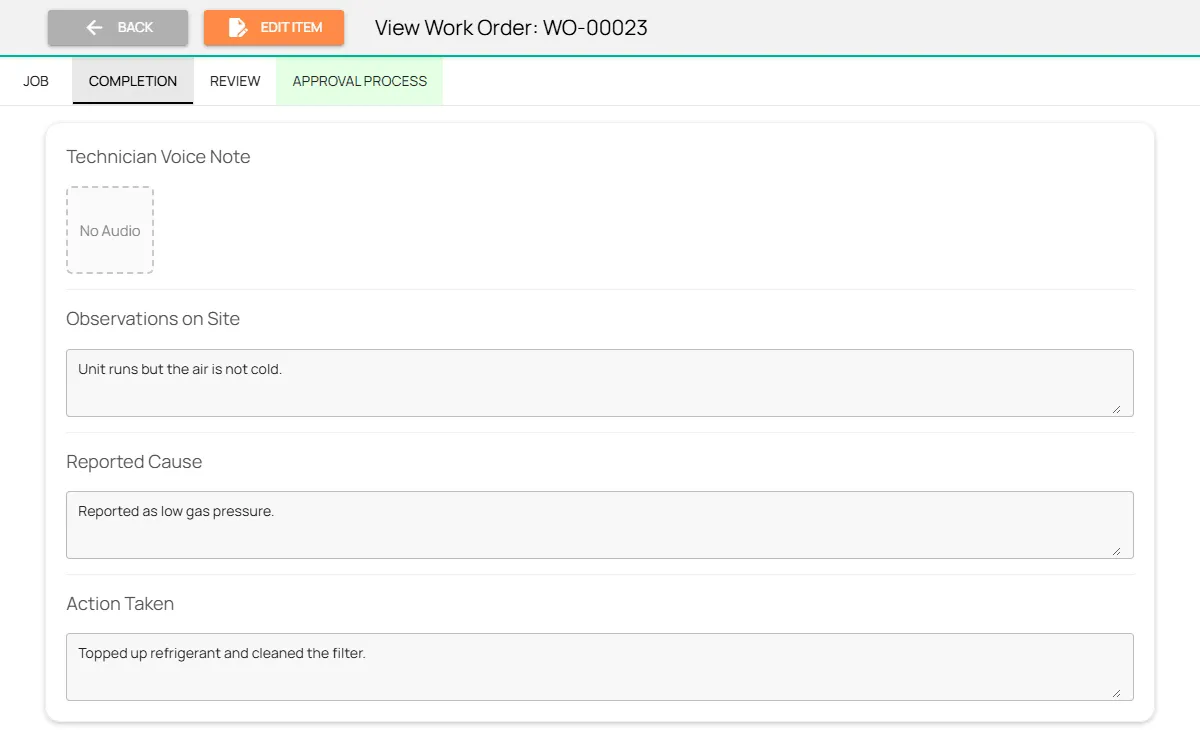
The technician’s voice note fills in the cause, the fix, the materials and the test result. AI drafts the service report and a plain summary for the tenant.
Handover differences
At move-out, AI compares the record with the move-in inspection and writes up what has changed.
Units captured by voice
Describe a unit and AI fills in the number, floor, type, rooms, area and occupancy.
Features
More Features Maintenance Teams Use
Preventive maintenance planner
Every asset’s services laid out week by week across the year, with weeks you can move.
Asset barcode scanning
Technicians scan the asset’s tag, so every record lands on the right asset.
Gauge and meter readings
The app reads pressure gauges and meters from a photo, so values aren’t typed by hand.
Safety checks
PPE, lockout/tagout and confined space entry recorded on every task, with photos.
Voice notes in any language
Technicians and inspectors talk through the job, and the form fills itself in.
Task map and routing
Jobs on a map, assigned by location and workload, with routes planned around working hours.
Site attendance
Technicians clock in with face ID inside the boundary of their assigned site.
Evidence rules and sign-off
A job can’t be submitted without its photos and test answer, and a supervisor accepts or returns it.
Service reports
An internal report and a customer-facing summary are drafted from each job, ready to edit.
Security and your data
Built for Operations Where Accountability Matters
How your data is protected, where it’s hosted, and how you take it with you.
Encrypted in transit and at rest
Field records, photos and documents are encrypted on their way from the device and while stored on our servers.
Choice of hosting location
Hosted in the US or the EU by default, on enterprise-grade servers. Other locations, for local data rules, are available at extra cost.
Automated backups
Backups run automatically across the whole system, so your data can be fully recovered after an emergency or a system failure.
Your data, yours to export
Your organization owns its data. Every module has an export to Excel, and photos and recordings are provided as download links on request.
Access managed by your admins
Your administrators add and remove people and decide what each role can see and do, down to a single site or unit, without a support ticket.
Complete audit trail
Every submission, edit and approval is time-stamped and attributed, with GPS-tagged photos, ready for audits and disputes.
FAQ
Questions About the Platform
Does the mobile app work offline?
Yes. Field teams can clock in, complete tasks, record inspections and capture photos with no connection. Everything is stored on the device and syncs to the dashboard as soon as it reconnects, so no work is lost.
Which languages does the app support?
The app supports more than 40 languages, including Arabic, Urdu, Hindi, Bengali, Malayalam, Tamil and Tagalog. It follows the language set on each worker’s device, so crews see instructions, checklists and tasks in the language they are most comfortable with. Voice notes can be recorded in any language, even mixing languages in one note. The words appear as the worker speaks, and they can read the English translation before submitting.
Can we build our own workflows?
Yes. Fieldmaster.ai is a low-code platform, and our team configures the forms, approval rules and task sequences to match your business rules. New workflows and changes are delivered in days, without a development project on your side.
Does it connect to our existing systems?
Yes. Fieldmaster.ai connects through open APIs, webhooks and Excel import and export, and can feed your reporting database. Our team builds the link to your ERP, billing or customer systems, so field data flows into the tools your office already uses.
What support do you provide?
Support comes straight from the people who built your app, in Muscat, Ajman and Cochin. During rollout we train your key users, who then train everyone else, and we stay close in the weeks after go-live.
After that, support is available by phone, email and chat, every request is tracked from report to verified fix, and changes to your app take days, not quarters.