
Fieldmaster.ai vs. Power Apps
A Power Apps Alternative Built for Field Teams
Power Apps is included with Microsoft 365. The app your field crews need still has to be designed, built, licensed, supported and changed. Fieldmaster.ai delivers that working app, built for the people doing the work.
A fair comparison
When Power Apps Is the Right Choice
Power Apps is a capable platform, and for many apps it’s the right tool. It’s a strong fit when:
The app lives in Microsoft 365
The data sits in SharePoint, Excel or Teams, and the users are office staff who work in Microsoft 365 all day.
You have makers or a partner
Your IT team or a Microsoft partner has the time and skills to build the app, license it correctly and keep it running.
The process is simple and stable
A request form or a simple approval that rarely changes is quick to build yourselves, using rights you may already have.
Side by side
Fieldmaster.ai vs. Power Apps
The same goal, a working app for your operation, reached by a very different path.
| Fieldmaster.ai | Power Apps | |
|---|---|---|
| Designed first for | Fieldmaster.ai Field crews and the office behind them | Power Apps Business users and developers building apps across Microsoft 365 |
| Who builds the app | Fieldmaster.ai We do, around your process, on a platform already proven in production | Power Apps Your own makers and developers, or a Microsoft partner |
| Time to first live app | Fieldmaster.ai A typical app takes 10 to 18 working days to build | Power Apps Depends on the scope, your team’s skills and your partner’s schedule |
| How customers pay | Fieldmaster.ai A setup fee and a yearly subscription priced on the work the app handles. Every user included. | Power Apps Some Microsoft 365 plans include limited rights, for Microsoft 365 data and standard connectors. Beyond that, Power Apps Premium is priced per user, per month, or pay-as-you-go through Azure. |
| AI for field work | Fieldmaster.ai Built in. Workers speak in Arabic, English, Hindi, Urdu and more, and AI fills the form. Photo AI reads meters, labels and plates, and rejects the wrong photo. It also spots problems in photos and checks that inspections were done properly. | Power Apps AI features such as form fill from documents and images. AI Builder features run on AI Builder credits or Copilot Credits, bought as capacity. |
| Changes after go-live | Fieldmaster.ai Usually in days, made by the people who built the app | Power Apps Made by your own makers, or by your partner |
| Support | Fieldmaster.ai Direct from the people who built it, in Muscat, Ajman and Cochin | Power Apps For the app itself, your own team or your partner |
Based on Microsoft’s public information as of October 2026. Product names, licences, features and prices change often; check with Microsoft or your licensing partner before deciding. Power Apps and Microsoft 365 are trademarks of Microsoft; Fieldmaster.ai is not affiliated with Microsoft.
The real cost
The Tool Is Included. The Working App Isn’t.
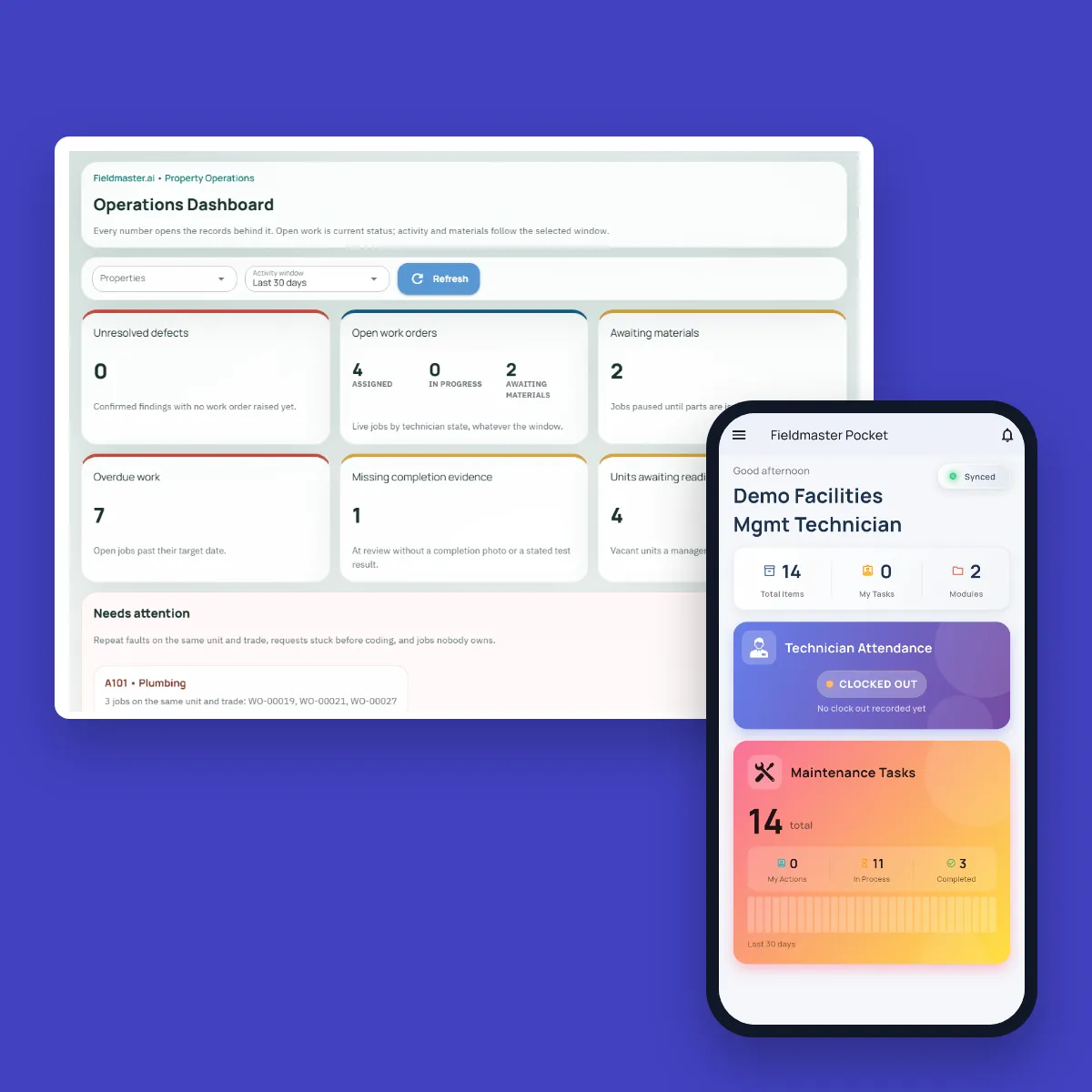
Power Apps gives you a capable tool. Turning it into an app your crews use every day still takes work: mapping the process, designing the phone screens, setting up approvals and roles, licensing the right users, connecting your systems, training people, and changing it all when the process changes.
With Fieldmaster.ai, that work is what we deliver. More than 95% of every app is the platform itself, already proven in production, so the project is spent on your process, not on building the basics. You pay a setup fee and a yearly subscription, instead of funding a build and its upkeep.
Built for the field
Designed for the Person Holding the Phone
Office tools assume a keyboard, a desk and a good connection. Field crews have gloves on, sun on the screen, patchy signal and many languages between them.
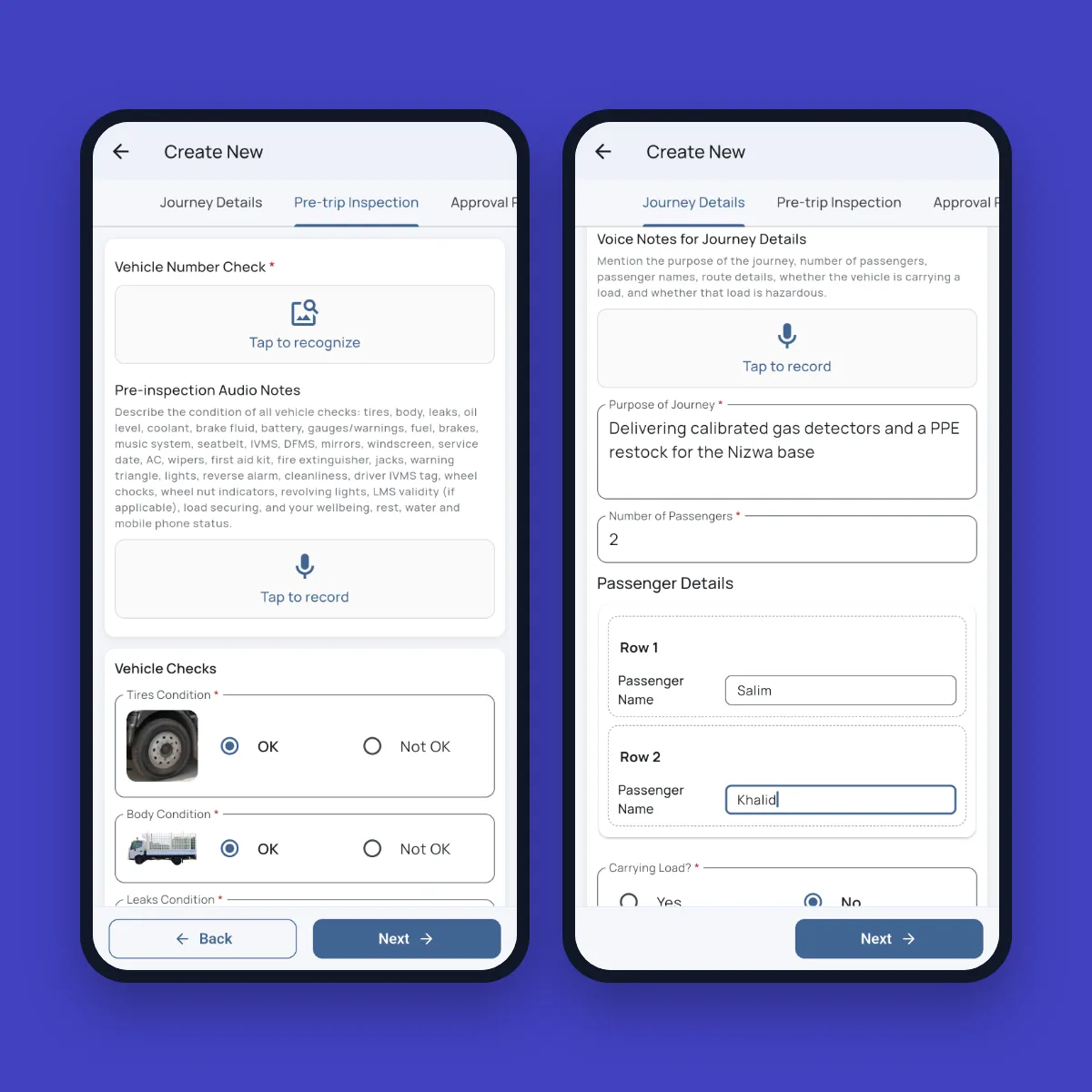
Fieldmaster Pocket is built for them. A driver describes the journey in a short voice note, in Arabic, Urdu, Hindi or English, and the form fills itself. A photo of the number plate is read and checked. Every record is stamped with GPS, time and who did it, and the app keeps working offline.
After go-live
What You Don’t Have to Manage
Licences for every user
Field crews, supervisors, clients and vendors all use the app. Pricing follows the work the app handles, never the number of people.
A backlog of changes
New screens, steps and reports usually land in days, made by the team that built your app.
Support for an app nobody else knows
You talk directly to the people who built your app, based in Muscat, Ajman and Cochin. Hosting, support, maintenance and AI usage are part of the subscription.
Keep comparing
Other Comparisons
Fieldmaster.ai vs. SafetyCulture
For teams choosing between a self-serve inspection tool and the whole process, delivered.
Fieldmaster.ai vs. ERP field service modules
For teams that already run an ERP and want clean field data to reach it.
The platform behind every app
The building blocks every Fieldmaster.ai app is made from, from voice fill to portals.
FAQ
Questions About Power Apps and Fieldmaster.ai
Isn’t Power Apps free with Microsoft 365?
Some Microsoft 365 plans include limited Power Apps rights, for apps that use Microsoft 365 data and standard connectors. Apps that need more, such as premium connectors or Dataverse, need Power Apps Premium licences or pay-as-you-go, and AI features run on credits.
Either way, building, supporting and changing the app takes your team’s time or a partner’s fee. Check your own licences with Microsoft or your licensing partner.
We’ve already built something in Power Apps. Do we have to replace it?
No. Keep the office apps that work well for you, and use Fieldmaster.ai for the process your field crews run. Fieldmaster.ai connects through APIs, webhooks and Excel import and export, so field data doesn’t have to be typed twice.
How long does it take to get an app live?
A typical app takes 10 to 18 working days to build. You see a working version of your own process on a phone early on, then your team tests it before go-live.
How is Fieldmaster.ai priced?
A setup fee and a yearly subscription priced on the work the app handles, such as items managed, journeys, purchase orders, permits or forms per month. Every user is included: field crews, supervisors, clients and vendors.
Which languages can field staff use?
The mobile app works in more than 40 languages, and workers can fill forms by voice in Arabic, English, Hindi, Urdu and many more. The office sees the record in English, with the original recording kept.
Who supports the app after go-live?
The people who built it. Support, hosting, maintenance and AI usage are included in the subscription, and changes usually land in days.