A maintenance management system is software that plans preventive maintenance, turns reported faults into jobs, sends those jobs to technicians and keeps a record of every job against the asset it was done on. It replaces the spreadsheet that holds the service plan, the phone calls that report faults and the paper job sheets that come back from site.
You will also see it called a CMMS or a CAFM system. The names differ, but the job is the same: make sure the right work is done on the right asset at the right time, and be able to prove it afterwards.
What a Maintenance Management System Does
Most systems are built around the same six parts:
- An asset register. Every asset has an ID, a location and a type, so work can be recorded against the thing it was done on.
- A preventive maintenance plan. Each asset has a service frequency. The system creates the task when it falls due, so nobody has to remember.
- Work orders for faults. A reported fault becomes a job with an owner, instead of a message in a chat group.
- A way to do the job on site. The technician sees the task, records what they found and what they did, and closes it.
- Parts and materials. The parts used on a job are recorded against it, so stock and cost can be traced.
- History and reports. Managers see what is due, what is late and what keeps failing.
If a tool does these six things, it is a maintenance management system, whatever it is called.
CMMS, CAFM and EAM: What the Names Mean
Three names come up when you search for this kind of software.
CMMS stands for computerized maintenance management system. The term comes from plant and equipment maintenance, and it is the most common name for the software described above.
CAFM stands for computer-aided facility management. It is the name most often used for buildings and the services inside them, such as air conditioning, lifts, pumps and electrical panels. Some CAFM products also cover things like space planning and room bookings.
EAM stands for enterprise asset management. It usually means a wider system that follows an asset through its whole life, from purchase to disposal, including its cost.
In practice the names overlap. A facilities contractor and a utility both need the same core: a list of assets, a plan, jobs and proof. Choose by what the system does for your operation, not by the label.
Planned and Reactive Work in One Place
Maintenance work comes from two directions.
Planned work is preventive: the quarterly service on a chiller, the monthly check on a fire pump, the yearly inspection of a valve. It is known in advance and it comes from the plan.
Reactive work arrives without warning: a leak, a tripped breaker, a complaint from a tenant.
When these are handled in different places, things slip. The plan lives in a spreadsheet and the faults live in phone calls, so nobody can see the full workload of a technician or the full history of an asset. A maintenance management system puts both through the same steps: the job is created, assigned, done and reviewed. That is what makes it possible to answer a simple question such as “when was this unit last serviced, and what was found?”
Signs You Have Outgrown Spreadsheets
A spreadsheet is a reasonable start for a small asset list. These are the signs it has stopped working:
- Services are missed when the person who keeps the plan is busy or on leave.
- The same fault is reported to three people, and either three technicians turn up or none.
- Job sheets come back with a signature but no readings, photos or findings.
- When an asset fails, nobody can show when it was last serviced.
- Parts leave the store or the van without being recorded against a job.
- You learn that work is late when the client or tenant complains.
If two or three of these are familiar, the cost of not having a system is already higher than the cost of one.
What to Look For When You Choose One
Feature lists for this kind of software look alike. The differences that matter show up on site, with the technician.
Does it work where your assets are? Plant rooms, basements and remote sites often have no signal. If the app needs a connection, technicians will write the job up later, from memory.
Can your technicians actually use it? A form in English is a barrier for a crew that speaks Hindi, Urdu or Arabic. Look for an app in the technician’s own language, and for ways to record work without typing, such as voice and photos.
Does it prove the work was done? A ticked box proves little. Scanning the asset’s tag, taking a photo and recording a reading show that the technician was at the right asset and what state it was in.
Does it fit your process? Your approval steps, your asset types and your client’s reporting format are not the same as anyone else’s. Ask what happens when the standard product does not match how you work.
Does it account for parts? If parts are not issued to the job, you cannot explain your material costs or charge them to the right client.
How long until it is live? A system that takes a year to roll out will be judged on a year of extra work before it helps anyone.
How to Roll One Out
You do not need to load every asset on day one. A first step that works:
- Pick one site or one contract, and list its assets with an ID and a location for each.
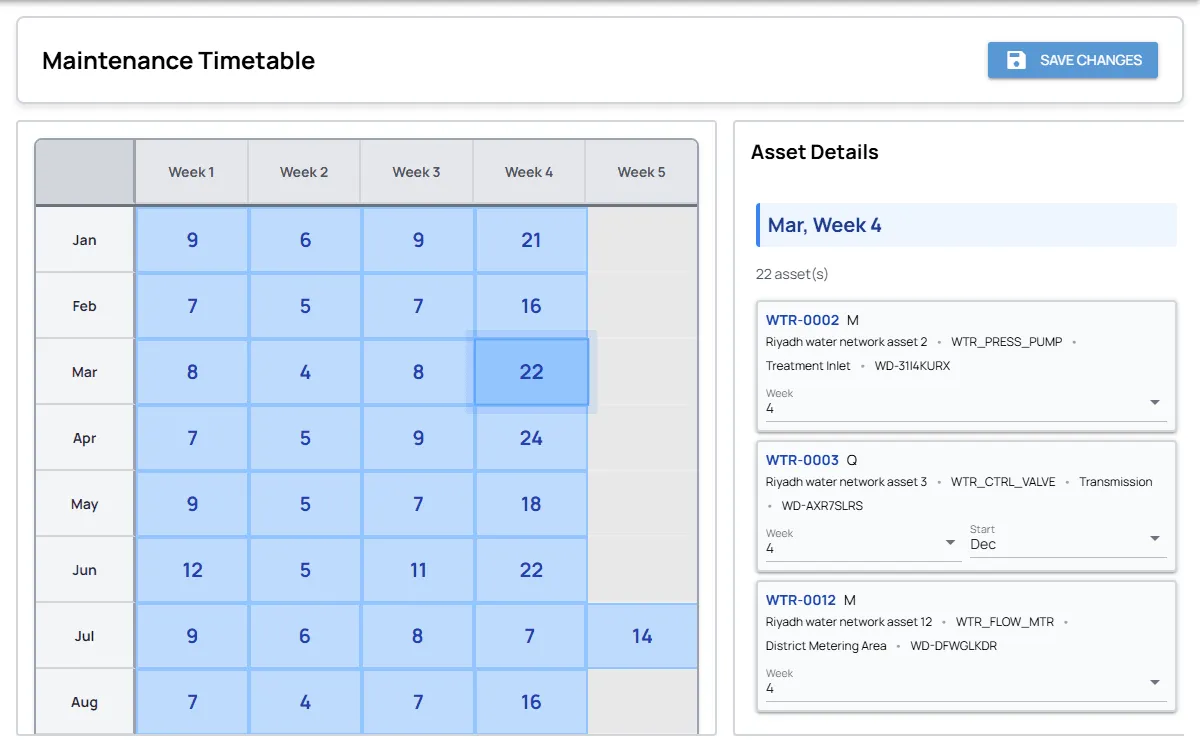
- Give each asset type a service frequency, and let the system build the timetable.
- Put the technicians for that site on the app, and send every job through it, planned and reactive.
- Review what is late and what was found each week with the supervisor.
After a month or two you will have a real history for those assets, and you will know what needs to change before the next site is added.
Common Questions
Is a maintenance management system the same as a CMMS?
For most buyers, yes. CMMS is the older technical name for the same kind of software. “Maintenance management system” is the plain description of what it does.
What is the difference between CMMS and CAFM?
CMMS is usually used for plant and equipment, and CAFM for buildings and the services inside them. Many organisations have both kinds of asset, and one system can cover them if it handles assets, plans, jobs and records well.
Is preventive maintenance software something different?
No. Preventive maintenance is one part of a maintenance management system: the part that creates tasks from each asset’s service schedule.
Do technicians need a phone?
In practice, yes. The value of the system comes from what is recorded at the asset, at the time of the work. A system that only the office uses becomes another place to type up paper.
How Fieldmaster Approaches It
Fieldmaster builds the app around your assets, sites and approval steps, so your team does not fit its process to a standard product and does not build anything itself. Each asset gets a service frequency and the timetable lays out the year. Reported faults become jobs on the same system. Technicians scan the asset, record its status and readings, and describe the work by voice, in their own language and without signal. Supervisors accept the job or send it back, and parts are recorded against the job.
A typical app is live in 10 to 18 working days. You can see the details on our maintenance management system page, follow the steps in how it works, or talk to us about your own asset list.