

Field AttendancePlatform
Built for Crews That Start Work Away From the Office
Face checks that work without signal, site inspections at clock-out, fences and rules set per site, rosters, alerts and payroll in one app, for the workers on their own phones and the crews clocked in by their supervisor.
Face check
Face Matching on the Phone, Even Without Signal
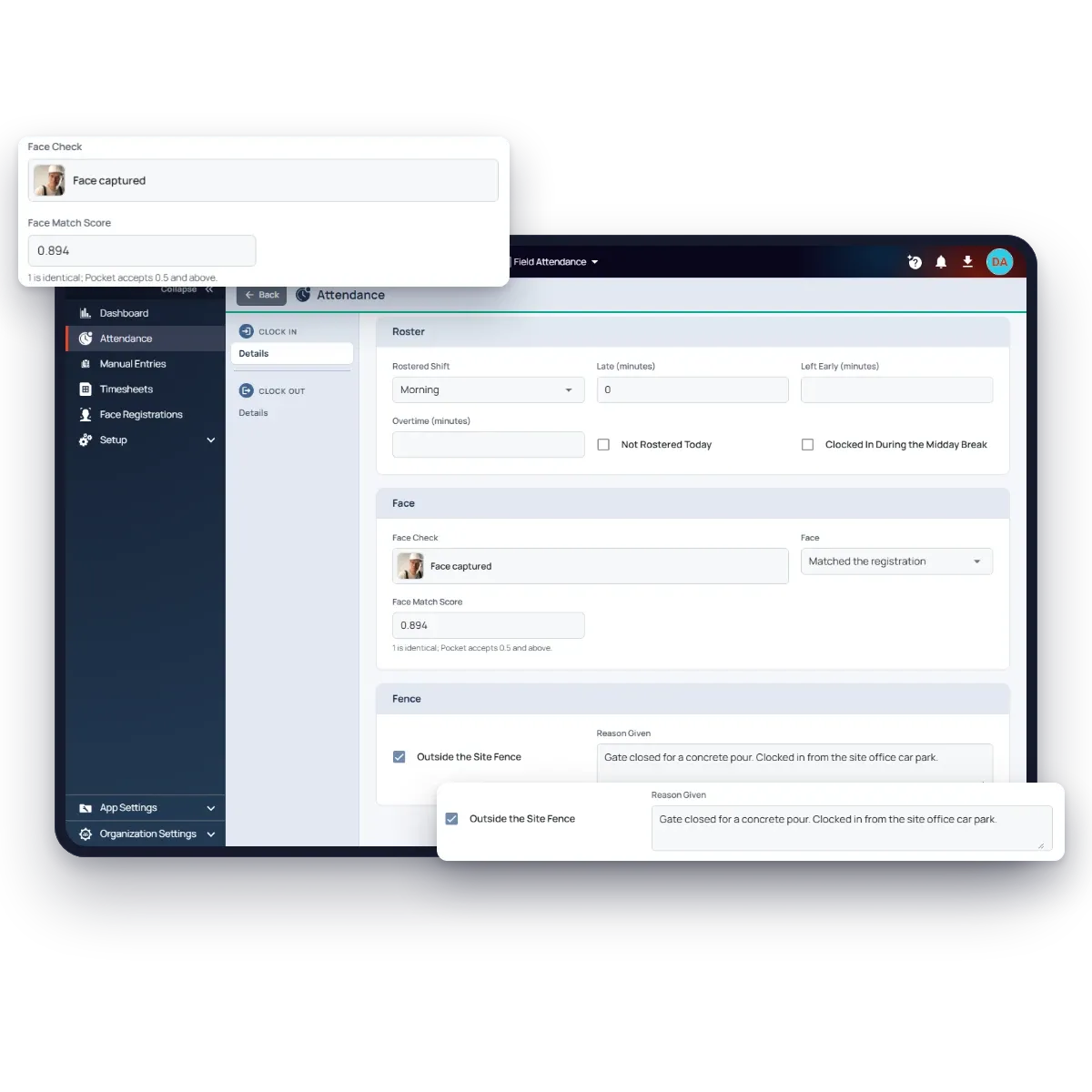
The face check runs on the phone, so a clock-in at a basement plant room or a remote site needs no connection. A blink and head-turn test makes sure a live person is in front of the camera, not a photo, and every face is matched against the worker’s registered face.
A clear match goes through. A match that only just passes is flagged as low confidence for a supervisor to look at, and a supervisor’s crew clock-in whose face doesn’t look like the chosen worker is flagged too. A worker’s phone carries only their own registered face, never their colleagues’.
Site inspection
A Site Inspection at Clock-Out, on the Schedule You Set
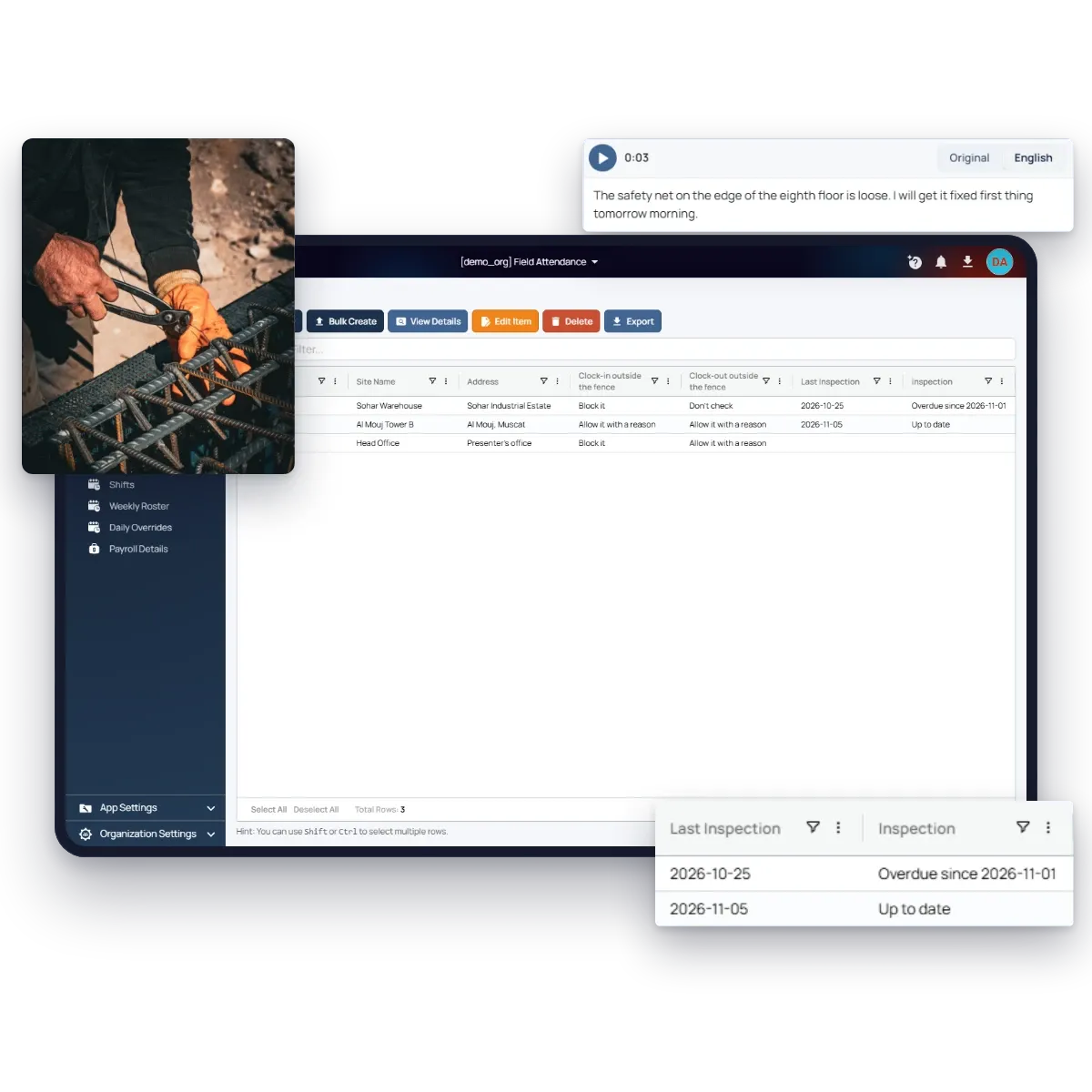
A site can ask for an inspection on a schedule: every day, on chosen days of the week, or on chosen dates of the month. When one is due, the site’s inspectors see it as they clock out there: up to 15 photos of the site and a voice note. They speak in their own language, and the office reads it in English, so a supervisor who isn’t comfortable writing a report can still give one.
One inspection covers the site for its due date, from whichever inspector clocks out first. The inspectors are the site’s supervisors, or only the people you pick. Make it mandatory, and nobody due to inspect can clock out without a photo, and a missed date is asked for at the next clock-out. Each site shows its last inspection, and the Sites list shows which are up to date and which are overdue.
Heat stress
Summer Midday Break Flagged on Outdoor Sites
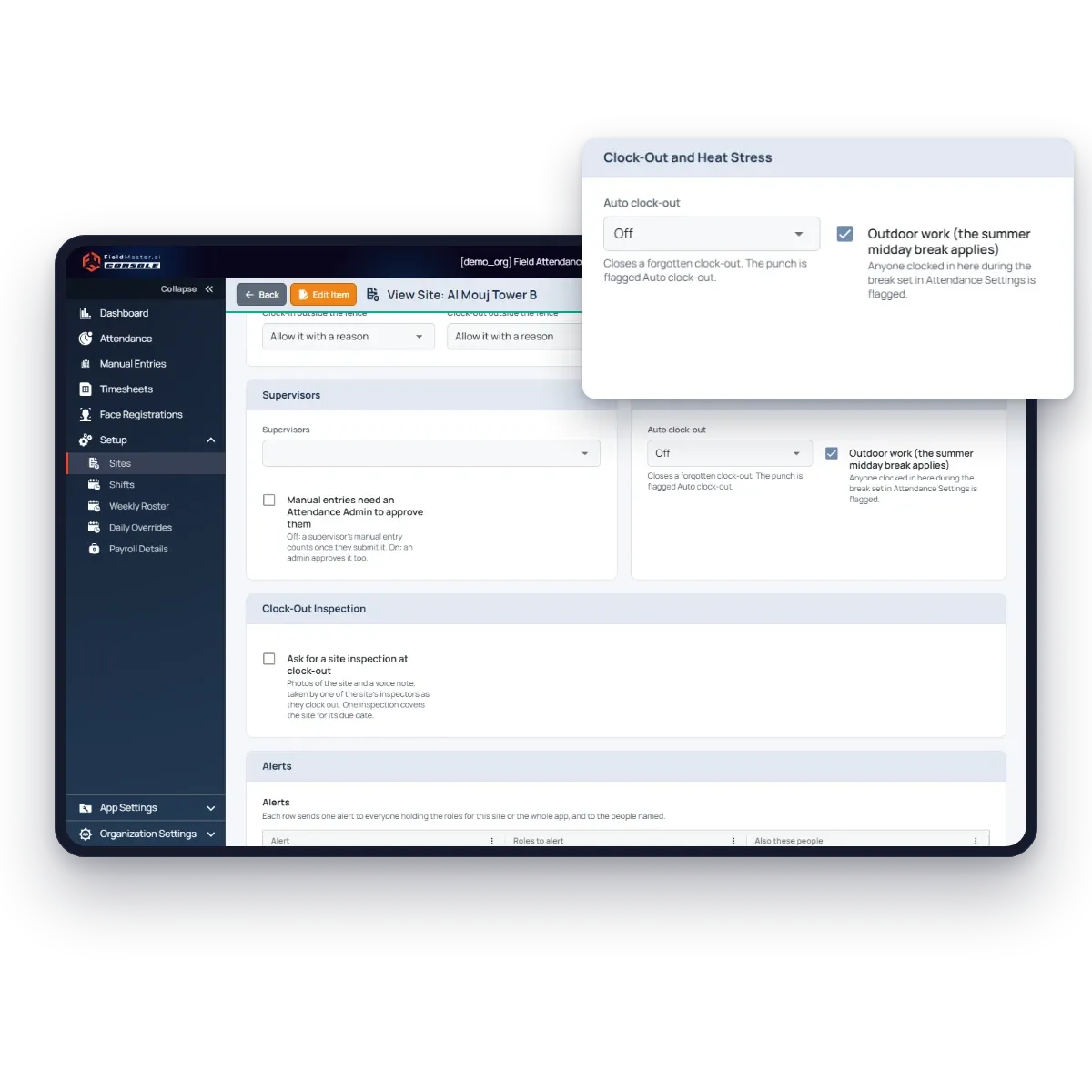
Mark a site as outdoor work, and choose the midday break rule for your country: Oman, the UAE, Saudi Arabia, Qatar, Kuwait or Bahrain, or your own hours and season. Anyone clocked in at an outdoor site during the break is flagged on their attendance, and the site can alert its supervisors as it happens.
The same card closes forgotten clock-outs: a set number of hours after the clock-in, or at the end of the worker’s shift, marked as an automatic clock-out so it’s never mistaken for a real one.
AI connectors
Ask ChatGPT or Claude About Your Attendance
Use your own LLM to ask about your clock-ins, sites and crews in plain words, and get the chart you need from your latest records, in seconds.
Each person only reaches the data they can already access in the app. AI connectors are opt-in, and not turned on by default.
Which site had the most late clock-ins this week?
Site C had the most late clock-ins this week (22).
Late clock-ins this week, by site
Site rules
Each Site Sets Its Own Rules
A head office, a client’s tower and a remote warehouse don’t work the same way, so each site keeps its own settings.
Fence rules
Refuse clock-ins outside the fence, or allow them with a reason, separately for clock-in and clock-out.
Supervisors
Adding someone as a site’s supervisor gives them that site’s attendance, crews, rosters and manual entries.
Manual entry approval
Choose whether a supervisor’s manual entry counts straight away, or waits for an admin to approve it.
Auto clock-out
Close forgotten clock-outs after a set number of hours, or at the end of the rostered shift.
Alerts
Late arrivals, no-shows, long shifts, clock-ins outside the fence and doubtful faces, each to the people you pick.
Outdoor work
Outdoor sites are checked against the summer midday break.
Clock-out inspection
Photos and a voice note of the site at clock-out, on the schedule you set.
Client contacts
People at your client who sign in with an emailed code to see the site’s Manpower Report.
Features
More Features Attendance Teams Use
Daily roster overrides
Annual, sick or other leave, training and shift swaps for one date, without changing the weekly roster.
Strict or flexible
Count a missing punch as absent, or let supervisors add it as a manual entry. Your choice, for the whole company.
Grace and overtime
Set the grace minutes before someone is late, and how long after the shift overtime starts.
Excel export
Attendance and timesheets export to Excel, filtered by site, worker and dates.
Arabic and 40 more languages
Pocket follows each worker’s phone language, including Arabic, Hindi, Urdu, Bangla and Tagalog.
Face Registrations
Every registered face on one page, with workers not yet registered, and a reset for a face that is wrong.
Security and your data
Built for Operations Where Accountability Matters
How your data is protected, where it’s hosted, and how you take it with you.
Encrypted in transit and at rest
Field records, photos and documents are encrypted on their way from the device and while stored on our servers.
Choice of hosting location
Hosted in the US or the EU by default, on enterprise-grade servers. Other locations, for local data rules, are available at extra cost.
Automated backups
Backups run automatically across the whole system, so your data can be fully recovered after an emergency or a system failure.
Your data, yours to export
Your organization owns its data. Every module has an export to Excel, and photos and recordings are provided as download links on request.
Access managed by your admins
Your administrators add and remove people and decide what each role can see and do, down to a single site or unit, without a support ticket.
Complete audit trail
Every submission, edit and approval is time-stamped and attributed, with GPS-tagged photos, ready for audits and disputes.
FAQ
Questions About the Features
Which phones does it run on?
Fieldmaster Pocket runs on Android and on iPhone (iOS 16 or later). Supervisors and admins also use the web console on any browser.
Where are the faces stored?
Each worker’s registered face is kept with your attendance data. A worker’s phone holds only their own registered face. Supervisors who clock in crews carry the registered faces of the workers they may clock in, so the match works without signal.
What if a worker’s appearance changes?
A supervisor resets their face from Face Registrations. Their next clock-in registers the face again, and their earlier clock-ins are kept.
Can we choose who inspects a site?
Yes. Leave Inspectors empty and every supervisor of the site and of the whole app can inspect it, or pick particular supervisors. Someone who stops being a supervisor stops being an inspector too.
Can different sites have different rules?
Yes. Fence rules, supervisors, manual entry approval, auto clock-out, outdoor work, site inspections, alerts and client contacts are all set per site. Lateness, overtime, the midday break rule and the WPS settings apply to the whole company.
Which WPS formats are supported?
The Oman WPS salary file and the UAE WPS SIF file. Each worker needs their payroll details: ID, bank code, account or IBAN and salary.