
Fieldmaster.ai vs. Connecteam
A Connecteam Alternative Built Around Your Field Process
Connecteam is a ready-made app for managing deskless teams: scheduling, time tracking, communication and HR, set up by you. Fieldmaster.ai is for when the field work is a process with approvals, stock, proof and reporting, and the app has to be built around how your company operates.
Side by side
Fieldmaster.ai vs. Connecteam
Fieldmaster.ai runs the whole process around the work, and we build it for you. Connecteam is the quicker start for do-it-yourself shifts, hours and staff communication.
| Fieldmaster.ai | Connecteam | |
|---|---|---|
| Designed first for | Fieldmaster.ai Field crews and the office process behind them, from first report to invoice | Connecteam Deskless and frontline teams in any industry: scheduling, time tracking, communication and HR in one app |
| Who builds the app | Fieldmaster.ai We do, around your process, and keep adapting it as you change | Connecteam You do. Open an account and set up your own schedules, time clocks, forms and tasks, from scratch or from templates. A personal success manager comes with the Enterprise plan. |
| Time to first live app | Fieldmaster.ai 10 to 18 working days for a typical app. It arrives finished, built around your process, and your team builds nothing. | Connecteam Connecteam says you can be fully set up in a day |
| How far it goes | Fieldmaster.ai The whole process: approvals, stock, purchasing, invoices, client and vendor portals, dashboards. Further apps run on the same platform, with the same users. | Connecteam Time clock, scheduling, forms and checklists, tasks, chat and updates, training, documents and time off. Managers can approve or reject submitted forms. |
| How customers pay | Fieldmaster.ai Every user included: crews, supervisors, clients and vendors. A setup fee, then a yearly subscription priced on the work the app handles, which also covers hosting and maintenance. | Connecteam Free for up to 10 users. Paid plans are priced per hub: a monthly fee that covers the first 30 users, then a fee for each extra user. Enterprise is quoted. |
| AI for field work | Fieldmaster.ai Built in. Workers speak in Arabic, English, Hindi, Urdu and more, and AI fills the whole form. Photo AI reads meters, labels and plates. It also spots problems in photos and checks that inspections were done properly. AI usage is included in the subscription. | Connecteam AI builds the schedule, turns a file or a photo of a paper form into a digital form, lets staff speak their answers into forms, and translates posts and chats. |
| Changes after go-live | Fieldmaster.ai Usually in days, made by the people who built the app, so nobody on your team has to maintain it. Your admins manage users, roles and permissions themselves. | Connecteam Your admins edit schedules, forms and settings themselves |
| Support | Fieldmaster.ai Included in the subscription. You talk directly to the people who built your app, in Muscat, Ajman and Cochin. | Connecteam 24/7 support by live chat and email, with a personal success manager on the Enterprise plan |
Based on Connecteam’s public information as of October 2026. Product names, plans, features and prices change often; check with the vendor before deciding. Connecteam is a trademark of its owner; Fieldmaster.ai is not affiliated with it.
Track record
A Platform Proven in Real Field Operations
Fieldmaster.ai grew out of our own field contracting work. These are the operations behind it, and the platform every new app is built on.
15M
Service visits completed
Field operations across the GCC and other international markets.
2015
In the field since
The year we started, as field contractors running crews across multiple sites.
20+
Apps built on one platform
Safety, fleet, utilities, waste, facilities, procurement and property.
10–18
Working days to build a typical app
Changes after go-live take days, made by the people who built it.
The whole process
From the Clock-In to the Finished Job
A time clock and a schedule tell you who was on shift, where and for how long. For many teams, that and a few forms are all the app needs to do.
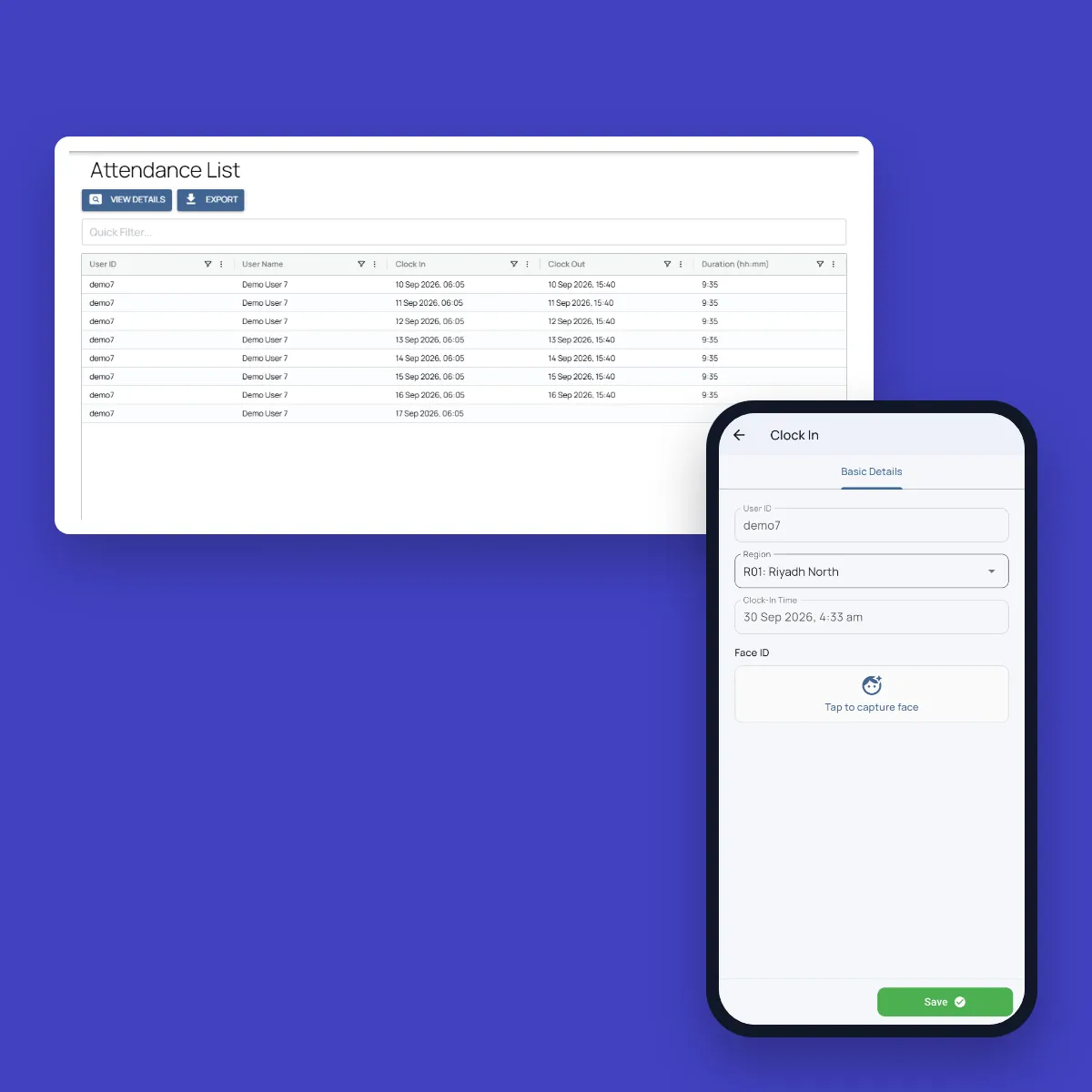
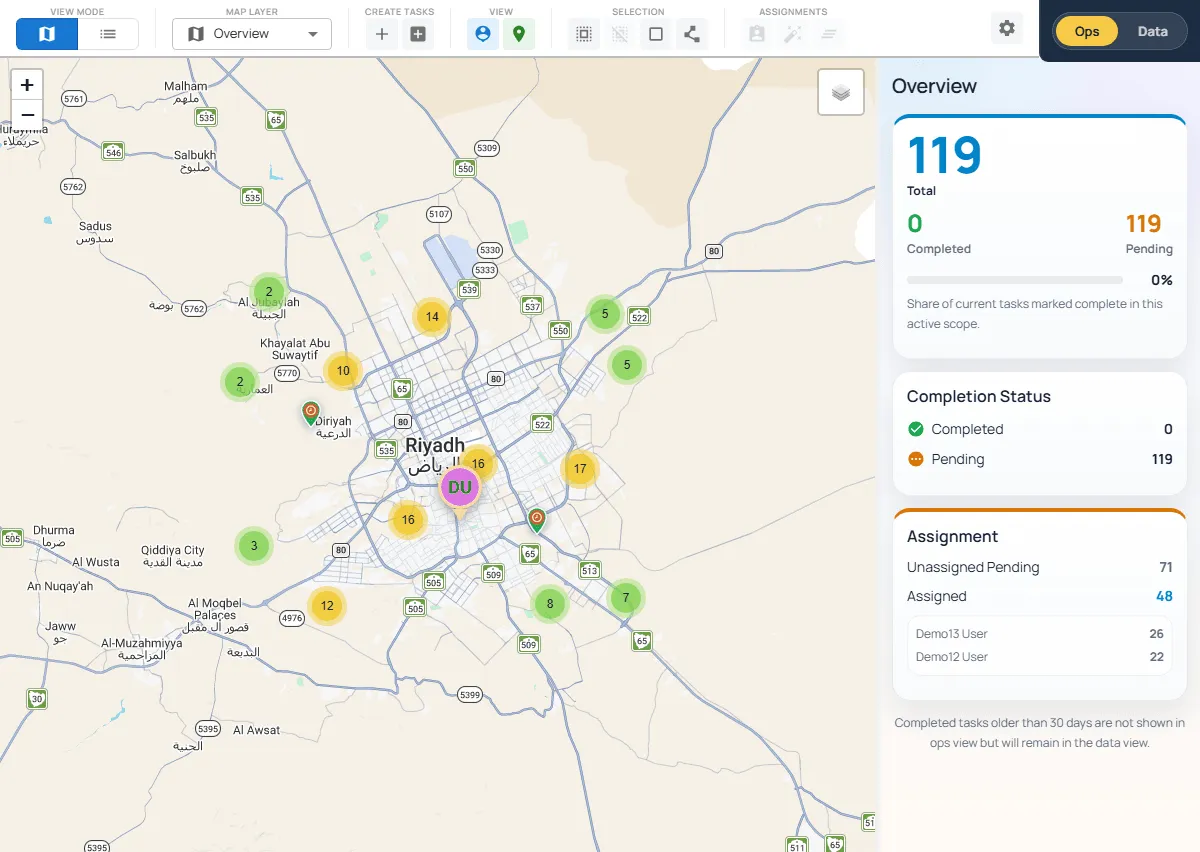
In other operations, the shift is a process. A job has to be assigned, done, proven with photos, approved by the right person and supplied from stock. Fieldmaster.ai keeps that in one app. A worker clocks in with a face check inside the site boundary and works through the jobs for the shift. Each job is recorded with GPS-stamped photos, the supervisor approves it or sends it back, and stock is issued against it. Field, office, clients and vendors each see their part, and the dashboards show all of it.
In practice
One Shift, Followed Through
How a shift runs in a Fieldmaster.ai app, from clock-in to the report.
Clock in on site
The worker clocks in on Fieldmaster Pocket with a face check, inside the boundary of the site they are assigned to.
Work the jobs
Workers see their jobs and route on the phone, scan the asset, take GPS-stamped photos and describe the work by voice.
Supervisor approves
Supervisors review the work and approve it, or send it back with a remark.
Office sees it
A supervisor sees who clocked in next to what each crew got done, and every list and chart exports to Excel.
Delivered, not do-it-yourself
We Build It. You Run It.
With a self-serve app, your team does the setup: schedules, forms, user access and every change after launch. That suits shifts, timesheets and checklists well. As the process grows into approval chains, stock and billing, it becomes a bigger job.
With Fieldmaster.ai, we build the app around your process, train your trainers, and stay on after go-live. When the process changes, tell us, and the change usually lands in days.
What Our Clients Say
Organizations use Fieldmaster to improve coordination between field teams and office operations.
“Fieldmaster helps me manage my team, achieve peak levels of operational efficiency, and it automates all the reporting. As a result, project revenues went up considerably. The best part is they provide excellent support and tweak the system frequently to solve ongoing challenges at no additional charge. We feel like we're in 2033.”

Baha Zrieqat
Billing Operations Manager
Oman National Engineering & Investment Co. SAOG
“Using Fieldmaster in our operations greatly enhanced the performance and quality of our data collection. We saw improvements from day one. The team provides immediate support and quickly implements necessary changes with effective solutions. We're thrilled to use such powerful software, backed by an outstanding support team.”

Omar Al Rawas
Data Manager
Nama Dhofar Services Co. SAOC
A fair comparison
When Connecteam Is the Right Choice
Connecteam is a capable all-in-one app, and for many teams it’s the right call. It fits well when:
You need it running this week
You open an account and set it up yourselves. Connecteam says you can be fully set up in a day, and it’s free for up to 10 users.
You only need shifts and hours
Scheduling shifts, clocking in with GPS and geofences, and sending timesheets to payroll are all you need. The work done during the shift doesn’t have to be assigned, proven or approved in the app.
You want communication and HR in the same app
Team chat, company updates, training, documents and time off sit alongside the schedule in one app.
Keep comparing
Other Comparisons
Fieldmaster.ai vs. SafetyCulture
For teams choosing between a self-serve inspection tool and the whole process, delivered.
Fieldmaster.ai vs. GoCanvas
For teams that have moved off paper forms and now need the process behind them.
All comparisons
Every comparison in one place, grouped by the kind of tool.
Pricing without per-user fees
How a setup fee and an activity-based subscription keep every user included.
FAQ
Questions About Connecteam and Fieldmaster.ai
Does Fieldmaster.ai do attendance too?
Yes. Workers clock in and out on the Fieldmaster Pocket app with a face check, a liveness test and their GPS location, inside the boundary of the site they are assigned to. Attendance lists export to Excel, filtered by site, crew and dates. The difference is what sits next to it: the jobs, approvals and stock for the same shift, in the same app.
Can we keep Connecteam for scheduling and staff communication?
Yes. If shifts, timesheets, staff communication and HR run well there, keep them. Fieldmaster.ai can take on the process around the work itself, such as approvals, stock, purchasing and invoicing, and connect to other systems through APIs, webhooks and Excel import and export.
Do we pay for every worker?
No. Fieldmaster.ai is priced on the work the app handles, such as items managed, journeys, purchase orders, permits or forms per month. Field crews, supervisors, clients and vendors are all included.
How long does it take to switch?
A typical app takes 10 to 18 working days to build. You can start with one process, such as attendance and the jobs for each shift, and add more later on the same platform and users.
Does it work without mobile signal?
Yes. Crews can fill in forms, take photos and approve work offline, and the face check at clock-in runs on the phone. Everything syncs automatically when the connection returns.
Who changes the app when our process changes?
We do. Changes after go-live usually land in days, made by the people who built your app, and support comes directly from them.
Do you work with companies outside the GCC?
Yes. Most of our work so far is in the GCC, and we take on companies in other regions too. The same team builds and supports your app, from Muscat, Ajman and Cochin.