.png)
.jpg)
While digital channels like apps and chatbots have gained popularity, phone support remains a cornerstone of customer service. According to a report by Influx, more than 50% of customers across all age groups typically use the phone to reach out to a service team.
However, the challenge isn't with the phone itself it's with what happens after the call. Many call centers operate in silos, disconnected from the tools field teams rely on. This gap often leads to lost context, missed information, and costly repeat visits.
The Disconnect: What Happens After a Customer Call?
When call centers run in silos, rich conversations get reduced to vague notes like:
“Customer called. Send a technician.”
There’s no voice recording. No location tag. No clear link to a task.
That means technicians are often walking into the unknown — fixing the wrong thing or coming unprepared.
But when calls are automatically logged with caller ID, timestamps, transcripts, and tied to the right field ticket, the whole chain becomes stronger.
Here’s what an effective, connected call-to-field workflow should look like:
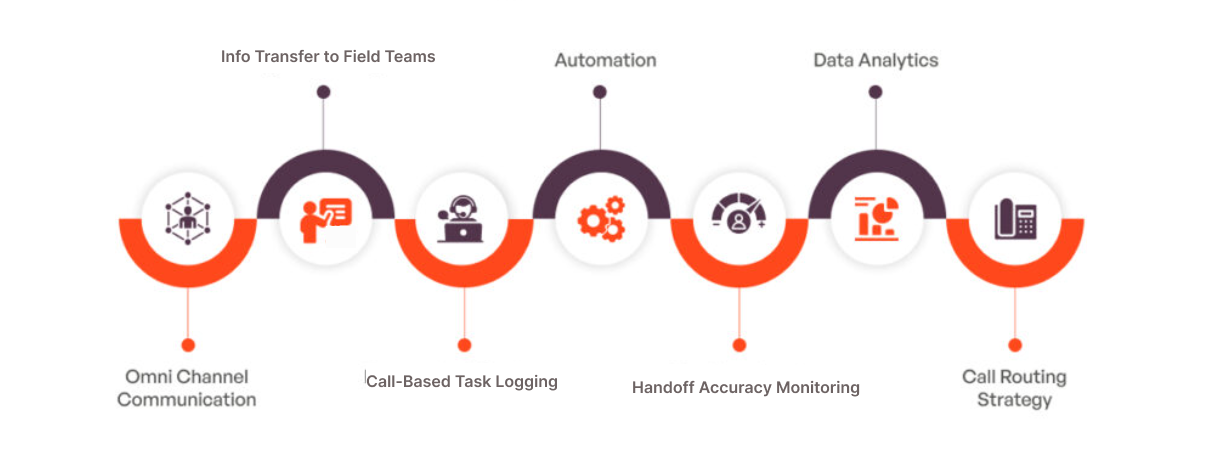
Why One Bad Call Can Cost You Two Site Visits
Repeat visits are expensive — and irritating for the customer.
Field Service News reports that failed first visits increase operational costs and hurt customer satisfaction.
The fix? Capture the right data from the first touchpoint: the phone call.
When those calls turn into structured tasks with all the context included, your team shows up prepared — and fixes it the first time.
Not Just for Utilities, Every Industry Stands to Gain
Phone support is still where service begins — but what happens after that call determines whether it ends in a resolution or a repeat visit. FieldMaster.ai integrated Contact Center helps industries of all kinds convert calls into clear, contextual field actions.
Here’s how different sectors benefit:
🏭 Manufacturing
Operators reporting equipment issues? The call links to the machine’s service history, creating a task with part requirements and past fault data so technicians arrive fully prepared.
🚚 Logistics
When drivers or customers call about delivery issues, those calls are auto-tagged to the shipment, triggering alerts for dispatch or rerouting without waiting for manual intervention.
🏦 Banking & Finance
Service requests related to ATMs, POS machines, or branch infrastructure are logged securely and linked to site IDs ensuring quick resolution and regulatory compliance.
📡 Telecommunications
From installation requests to complaint calls, everything is converted into structured field tickets, complete with location, caller history, and device data — so engineers know exactly what to fix.
🏘️ Property Management
A tenant reports a broken tap or electrical issue. The system logs the call under the correct unit, auto-generates a task, and notifies the assigned contractor no follow-up needed.
💼 Field Sales
Prospect or client follow-ups become geo-tagged tasks for sales reps — with full call context and CRM linkage, helping them prioritize effectively and close faster.
⚡ Utilities
Outage reports and fault calls are tagged to the grid or zone, logged with caller data and timestamps, and routed to field crews — reducing downtime and repeat inquiries.
The Call Center Doesn’t Need to Work Harder. It Needs to Work Smarter.
Modern call center integrations offer features that streamline operations:
- Automatic Call Logging: All calls (inbound, outbound, missed) are logged with metadata, ensuring no interaction is lost.
- Caller History Access: Agents can view caller history before answering, providing context for more effective communication.
- Task Conversion: Calls and texts can be converted into tasks for field teams, ensuring timely follow-ups.
- Missed Call Follow-Ups: Automated follow-ups for missed calls ensure no customer is left unattended.
- Searchable Conversations: All interactions are searchable and reportable, aiding in performance analysis and training.
These features eliminate the need for agents to toggle between tabs and prevent technicians from being uninformed about customer interactions.
From Calls to Resolutions
If your team still relies on scribbled notes or verbal summaries, you're not capturing the full picture. And when the field team doesn't have the full picture, issues can escalate.
A connected system doesn't just log the call—it initiates the solution. By ensuring every phone call becomes a clear, contextual task, businesses can enhance efficiency, reduce repeat visits, and improve customer satisfaction.
In field service, understanding "what the customer said" should never be a mystery.
.png)

"FieldMaster.ai transformed how we manage our operations across multiple sites. The accuracy we gained from field-first data collection eliminated costly mistakes and saved us months of reconciliation work."
Ready to transform operations
Discover how FieldMaster AI helps companies like yours achieve field KPIs with precision and speed.

Stay ahead in the field
Get insights and strategies delivered to your inbox every week from FieldMaster AI.
FAQs
Questions about field-first data and how FieldMaster AI works
Field-first data is information captured at the source, where work actually happens. Instead of relying on reports compiled hours or days later, it's collected in real-time by workers on the ground. This approach eliminates the gaps and inaccuracies that come from office-based data collection.
FieldMaster AI's mobile app functions completely offline. Workers collect data without internet connectivity, and when the connection returns, all information syncs automatically. Nothing is lost, and operations continue uninterrupted regardless of network conditions.
Yes. Our native mobile app is built with zero-effort multilingual support. Workers of any ethnicity or language background become instantly familiar with the interface. There's no language barrier to adoption or understanding.
It means each user sees only the information relevant to their role. A supervisor has different access than a manager, who has different access than a field worker. This keeps operations organized and ensures people focus on what matters to them.
We've been in business since 2015, starting as field contractors ourselves. That experience shaped everything we built. We've added over $200 million in value to projects across the GCC by focusing on what actually works in the field.