.png)
.jpg)
Approvals aren’t supposed to be this hard. But for most operations teams, they’re a daily bottleneck.
Someone requests signoff. The email gets lost. The document isn’t attached. No one knows who’s supposed to act. A task that should move in a few hours drags on for days. And when someone finally checks in, they’re met with: “I didn’t see it.”
It’s not about effort. It’s about how approvals are being managed.
That’s exactly why operations heads are turning to approval workflow software—purpose-built tools that take the guesswork out of who approves what, and when. They’re replacing scattered messages with structured systems that track every step, notify the right people, and maintain accountability from start to finish.
Why Email Isn’t Designed for Approval Workflows
Let’s say someone needs approval for a compliance checklist, internal task closure, or vendor payout.
They send an email with the document attached. It goes to three people, hoping one will take charge. A few days pass. No one replies. Maybe someone saw it and meant to respond. Maybe it got buried under a dozen other threads. There’s no system record, no deadline, no alert.
This is how delays pile up in operations—not because of bad teams, but because email doesn’t provide visibility, accountability, or ownership. It's just communication. It’s not workflow.
That’s where approval management systems come in.
How Approval Workflow Software Changes the Game
Teams that shift to a structured task approval platform don’t just move faster—they move with clarity.
Let’s walk through what actually changes when you move approvals into a system built for operational use.
Here’s what a structured approval workflow actually looks like—step by step.
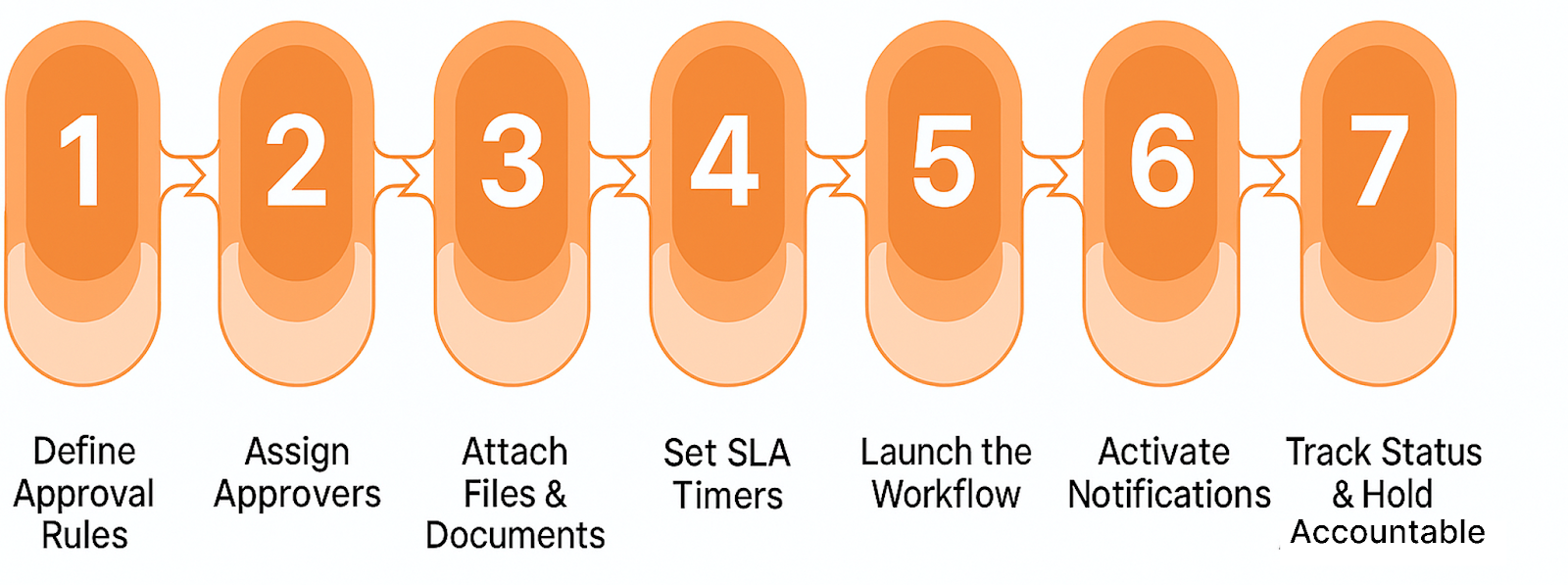
✅ The Right Approver is Assigned Automatically
One of the first things that slows approvals down? Unclear ownership.
With an approval workflow system, each request is routed based on logic: department, team structure, approval level, or even geography. You don’t need to manually pick who should act—assignments follow rules set by the ops team.
Approvals don’t sit in limbo because “someone forgot.” They go to the right person, and the system logs the handoff.
✅ Everyone Can See the Status
You shouldn't have to chase down status. With real-time approval tracking, teams see where every request stands: who it was sent to, when they opened it, what action they took, and how long it’s been waiting.
This timeline replaces awkward follow-ups. You’re not asking “Did this get approved?” You already know.
✅ SLA Timers Catch the Delays Before They Pile Up
Many approvals drag simply because no one notices they’re stuck.
That’s why approval workflow software includes SLA configuration. You can define how long a request should stay open before it’s flagged. If someone hasn’t acted, the system notifies them—or escalates it, depending on your rules.
It’s not about micromanaging people. It’s about keeping the process moving before someone needs to ask.
✅ Access Is Controlled, Actions Are Logged
Approval flows are part of how companies manage risk. That means access matters—and records matter even more.
Workflow platforms include role-based access control, ensuring only designated users can approve specific requests. Every step—assigned, viewed, approved, reassigned—is time-stamped and saved. So when leadership or auditors need a record, it's already there.
This isn’t just about speed. It’s about traceability.
✅ Files Stay With the Request
Approvals often hinge on attached information: photos, reports, checklists, or ID documents.
Inside a proper process approval platform, all those files are uploaded as part of the request. The approver sees the latest version right there—no downloads, no searching threads, no resending.
Comments, revision history, and attached documentation stay together. Nothing gets lost in handoffs.
✅ Notifications Happen Quietly ,But Reliably
Ops teams don’t need more dashboards to check or alerts that feel like noise.
That’s why good workflow automation tools are designed to notify only when it matters: when a task is assigned, when it’s pending too long, or when a request is completed.
You can also configure regular reports for managers to see open approvals, turnaround times, and delay patterns across departments.
The Ops Perspective:
Operations isn’t about rushing work through. It’s about making sure the right process is followed, and that every step is traceable.
When approvals are routed by rules, tracked by the minute, and backed by documented records, teams don’t have to wonder if things were missed. They can move forward confidently.
This is what approval workflow software enables:
- Clear accountability
- Fewer stalls
- Fewer follow-ups
- And an approval trail no one has to reconstruct later
A Typical Workflow in Action
Picture this:
A regional manager needs to approve a compliance checklist submitted by a coordinator.
- The request is auto-assigned based on hierarchy.
- The checklist is attached within the request.
- The system starts tracking time immediately.
- The manager gets notified via email.
- They open the request, comment on a missing detail, and send it back.
- The coordinator updates the file and resubmits.
- The request is approved—action time, reason, and final version logged.
No confusion. No “Did you see my email?” Just a clean process that everyone can follow—even weeks later.
Wrapping Up: One Workflow, Fewer Headaches
Most operational delays aren’t caused by a lack of effort—they stem from approvals being managed through outdated, unstructured processes.
Modern approval workflow software brings structure to the chaos—offering routing, alerts, access controls, and clear status tracking.
It’s not about speeding up for the sake of it. It’s about having visibility into every step—so your team can move forward with confidence.
.png)

"Fieldmaster.ai transformed how we manage our operations across multiple sites. The accuracy we gained from field-first data collection eliminated costly mistakes and saved us months of reconciliation work."
Ready to transform operations
Discover how FieldMaster AI helps companies like yours achieve field KPIs with precision and speed.

Stay ahead in the field
Get insights and strategies delivered to your inbox every week from FieldMaster AI.
FAQs
Questions about field-first data and how FieldMaster AI works
Field-first data is information captured at the source, where work actually happens. Instead of relying on reports compiled hours or days later, it's collected in real-time by workers on the ground. This approach eliminates the gaps and inaccuracies that come from office-based data collection.
FieldMaster AI's mobile app functions completely offline. Workers collect data without internet connectivity, and when the connection returns, all information syncs automatically. Nothing is lost, and operations continue uninterrupted regardless of network conditions.
Yes. Our native mobile app is built with zero-effort multilingual support. Workers of any ethnicity or language background become instantly familiar with the interface. There's no language barrier to adoption or understanding.
It means each user sees only the information relevant to their role. A supervisor has different access than a manager, who has different access than a field worker. This keeps operations organized and ensures people focus on what matters to them.
We've been in business since 2015, starting as field contractors ourselves. That experience shaped everything we built. We've added over $200 million in value to projects across the GCC by focusing on what actually works in the field.